Hyperparameter sweeps systematically test parameter combinations to find the best-performing model for the least compute or training time. This tutorial covers training Llama 3.2, using Wandb (Weights and Biases) to run hyperparameter sweeps and Cerebrium to scale experiments across serverless GPUs. View the final version on GitHub. Read this section if you’re unfamiliar with sweeps.

Analogy: Pizza Topping Sweep

Forget about ML for a second. Imagine making pizzas to discover the best combination of toppings. Three variables are available: Type of Cheese (mozzarella, cheddar, parmesan) Type of Sauce (tomato, pesto) Extra Topping (pepperoni, mushrooms, olives) There are 12 possible combinations. One of them will taste the best. To find the tastiest pizza, try all combinations and rate them. This process is a hyperparameter sweep. The three hyperparameters are cheese, sauce, and extra topping. One pizza at a time takes hours. With 12 ovens, all pizzas bake at once and the best one emerges in minutes. If a kitchen is a GPU, 12 GPUs run all experiments in parallel. Cerebrium enables sweeps across 12 GPUs (or 1,000) to find the best model version fast.

Setup Cerebrium

If you don’t have a Cerebrium account, run the following:
pip install cerebrium --upgrade
cerebrium login
cerebrium init wandb-sweep
This creates a folder with two files:
  • main.py - The entrypoint file where application code lives.
  • cerebrium.toml - A configuration file for build and environment settings.
The rest of this tutorial continues in this folder.

Setup Wandb

Weights & Biases (Wandb) tracks, visualizes, and manages machine learning experiments in real-time. It logs hyperparameters, metrics, and results for comparing models and optimizing performance.
  1. Sign up for a free account and then log in to your wandb account by running the following in your CLI.
pip install wandb
wandb login
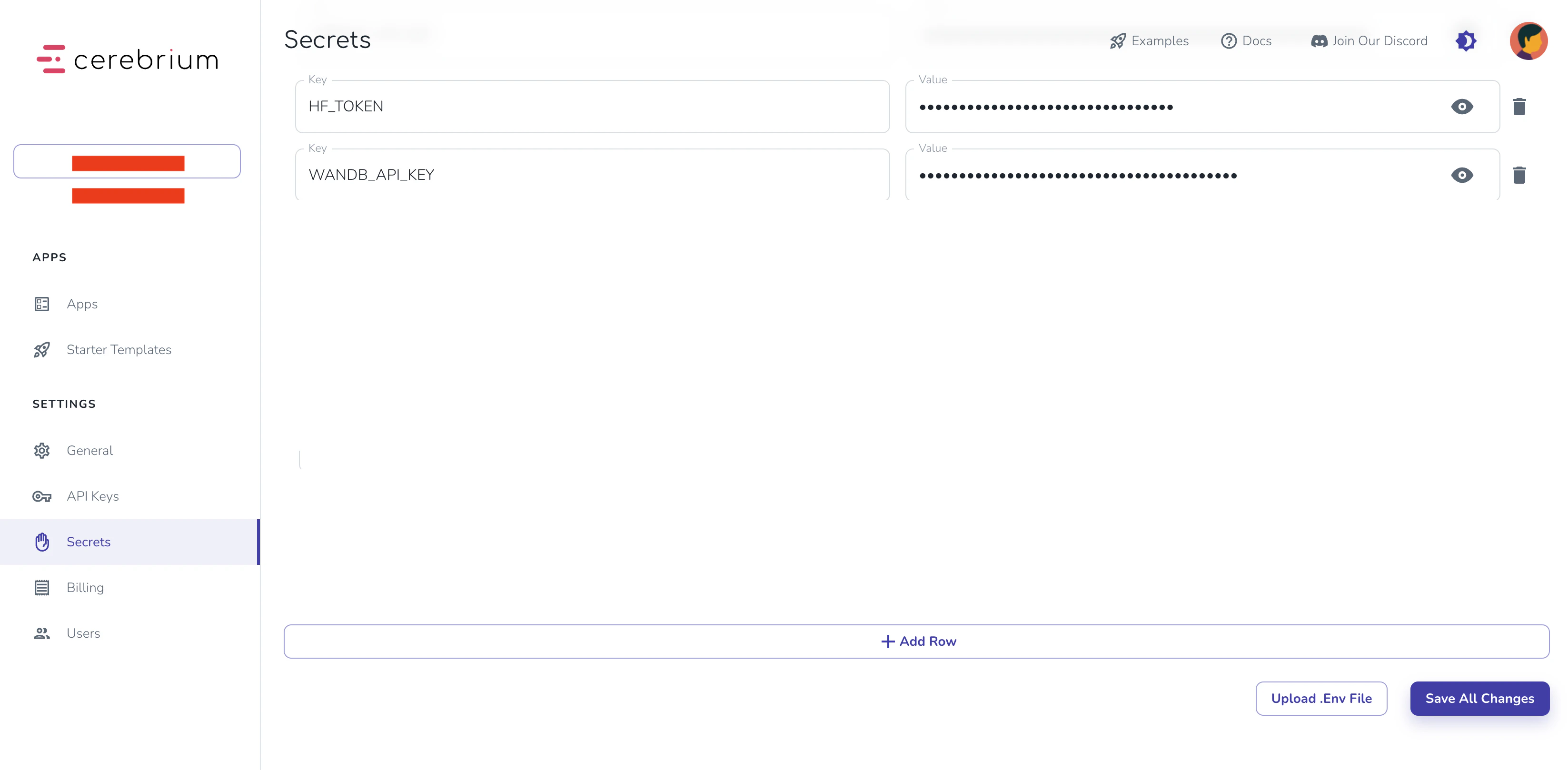
A link prints in the terminal — click it and copy the API key back into the terminal. Add the W&B API key to Cerebrium secrets. In the Cerebrium Dashboard, navigate to the “secrets” tab in the left sidebar. Add the following:
  • Key: WANDB_API_KEY
  • Value: The value you copied from the Wandb website.
Click the “Save All Changes” button. Cerebrium Secrets Wandb authentication is now complete.

Training Script

To train with Llama 3.2, you’ll need:
  1. Model access permission:
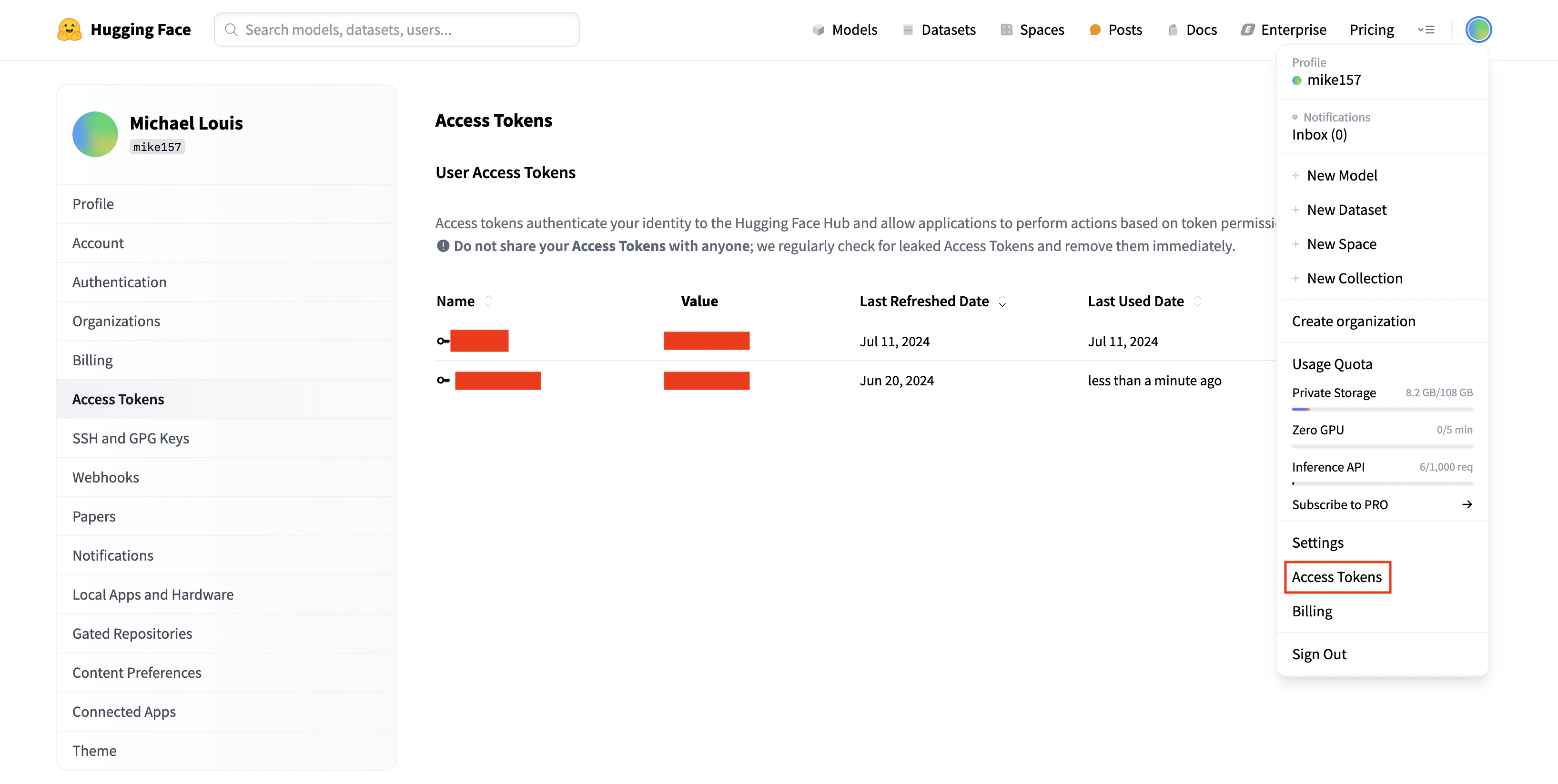
  2. Hugging Face token:
    • Click your profile image (top right)
    • Select “Access token”
    • Create a new token if needed
    • Add to Cerebrium Secrets:
      • Key: HF_TOKEN
      • Value: Your Hugging Face token
    • Click “Save All Changes”
Hugging Face Token The training script adapts this Kaggle notebook. Create a requirements.txt file with these dependencies:
transformers
datasets
accelerate
peft
trl
bitsandbytes
wandb
These packages are required both locally and on Cerebrium. Update your cerebrium.toml to include:
  • The requirements.txt path
  • Hardware requirements for training
  • A 1-hour max timeout using response_grace_period
Add this configuration:
#existing configuration

[cerebrium.hardware]
cpu = 6
memory = 30.0
compute = "ADA_L40"

[cerebrium.scaling]
#existing configuration
response_grace_period = 3600

[cerebrium.dependencies.paths]
pip = "requirements.txt"
Install the dependencies locally:
pip install -r requirements.txt
Add this code to main.py:
import os
from typing import Dict
import wandb
from transformers import (
    AutoModelForCausalLM,
    AutoTokenizer,
    BitsAndBytesConfig,
    TrainingArguments,
)
from peft import LoraConfig, get_peft_model
from datasets import load_dataset
from trl import SFTTrainer, setup_chat_format
import torch
import bitsandbytes as bnb
from huggingface_hub import login

login(token=os.getenv("HF_TOKEN"))

def find_all_linear_names(model):
    cls = bnb.nn.Linear4bit
    lora_module_names = set()
    for name, module in model.named_modules():
        if isinstance(module, cls):
            names = name.split('.')
            lora_module_names.add(names[0] if len(names) == 1 else names[-1])
    if 'lm_head' in lora_module_names:
        lora_module_names.remove('lm_head')
    return list(lora_module_names)

def train_model(params: Dict):
    """
    Training function that receives parameters from the Cerebrium endpoint
    """
    # Initialize wandb
    wandb.login(key=os.getenv("WANDB_API_KEY"))
    wandb.init(
        project=params.get("wandb_project", "Llama-3.2-Customer-Support"),
        name=params.get("run_name", None),
        config=params,
    )

    # Model configuration
    base_model = params.get("base_model", "meta-llama/Llama-3.2-3B-Instruct")
    new_model = params.get("output_model_name", f"/persistent-storage/llama-3.2-3b-it-Customer-Support-{wandb.run.id}")

    # Set torch dtype and attention implementation
    torch_dtype = torch.bfloat16 if torch.cuda.get_device_capability()[0] >= 8 else torch.float16
    attn_implementation = "eager"

    # QLoRA config
    bnb_config = BitsAndBytesConfig(
        load_in_4bit=True,
        bnb_4bit_quant_type="nf4",
        bnb_4bit_compute_dtype=torch_dtype,
        bnb_4bit_use_double_quant=True,
    )

    # Load model and tokenizer
    model = AutoModelForCausalLM.from_pretrained(
        base_model,
        quantization_config=bnb_config,
        device_map="auto",
        attn_implementation=attn_implementation
    )
    tokenizer = AutoTokenizer.from_pretrained(base_model, trust_remote_code=True)

    # Find linear modules
    modules = find_all_linear_names(model)

    # LoRA config
    peft_config = LoraConfig(
        r=params.get("lora_r", 16),
        lora_alpha=params.get("lora_alpha", 32),
        lora_dropout=params.get("lora_dropout", 0.05),
        bias="none",
        task_type="CAUSAL_LM",
        target_modules=modules
    )

    # Setup model
    tokenizer.chat_template = None  # Clear existing chat template
    model, tokenizer = setup_chat_format(model, tokenizer)
    model = get_peft_model(model, peft_config)

    # Load and prepare dataset
    dataset = load_dataset(
        params.get("dataset_name", "bitext/Bitext-customer-support-llm-chatbot-training-dataset"),
        split="train"
    )
    dataset = dataset.shuffle(seed=params.get("seed", 65))
    if params.get("max_samples"):
        dataset = dataset.select(range(params.get("max_samples")))

    instruction = params.get("instruction",
        """You are a top-rated customer service agent named John.
        Be polite to customers and answer all their questions."""
    )

    def format_chat_template(row):
        row_json = [
            {"role": "system", "content": instruction},
            {"role": "user", "content": row["instruction"]},
            {"role": "assistant", "content": row["response"]}
        ]
        row["text"] = tokenizer.apply_chat_template(row_json, tokenize=False)
        return row

    dataset = dataset.map(format_chat_template, num_proc=4)
    dataset = dataset.train_test_split(test_size=params.get("test_size", 0.1))

    # Training arguments
    training_arguments = TrainingArguments(
        output_dir=new_model,
        per_device_train_batch_size=params.get("batch_size", 1),
        per_device_eval_batch_size=params.get("batch_size", 1),
        gradient_accumulation_steps=params.get("gradient_accumulation_steps", 2),
        optim="paged_adamw_32bit",
        num_train_epochs=params.get("epochs", 1),
        eval_strategy="steps",
        eval_steps=params.get("eval_steps", 0.2),
        logging_steps=params.get("logging_steps", 1),
        warmup_steps=params.get("warmup_steps", 10),
        learning_rate=params.get("learning_rate", 2e-4),
        fp16=params.get("fp16", False),
        bf16=params.get("bf16", False),
        group_by_length=params.get("group_by_length", True),
        report_to="wandb"
    )

    # Initialize trainer
    trainer = SFTTrainer(
        model=model,
        train_dataset=dataset["train"],
        eval_dataset=dataset["test"],
        peft_config=peft_config,
        args=training_arguments,
    )

    # Train and save
    model.config.use_cache = False
    trainer.train()
    model.config.use_cache = True

    # Save model
    trainer.model.save_pretrained(new_model)

    wandb.finish()
    return {"status": "success", "model_path": new_model}
You can read a deeper explanation of the training script here but here’s a high-level explanation of the code in bullet points:
  • This code sets up a fine-tuning pipeline for a Large Language Model (specifically Llama 3.2) using several modern training techniques:
  • Takes a dictionary of parameters for flexible training configurations — the hyperparameter sweep.
  • Loads a customer support dataset from Hugging Face and formats it into chat template format
  • Implements QLoRA (Quantized Low-Rank Adaptation) for efficient fine-tuning.
  • Uses Weights & Biases (Wandb) for experiment tracking, logging results to the Wandb dashboard.
  • Saves the final model to a Cerebrium volume and returns a “success” message.
Deploy the training endpoint:
cerebrium deploy
This command:
  1. Sets up the environment with required packages
  2. Deploys the training script as an endpoint
  3. Returns a POST URL (save this for later)
Cerebrium requires no special decorators or syntax — wrap the training code in a function. The endpoint automatically scales based on request volume, making it ideal for hyperparameter sweeps.

Hyperparameter Sweep

Create a run.py file for running locally. Add the following code:
import wandb
import requests
import os
from typing import Dict, Any
from dotenv import load_dotenv
load_dotenv()

CEREBRIUM_API_KEY = os.getenv("CEREBRIUM_API_KEY")
ENDPOINT_URL = "https://api.aws.us-east-1.cerebrium.ai/v4/p-xxxxx/wandb-sweep/train_model?async=true"

def train_with_params(params: Dict[str, Any]):
    """
    Send training parameters to Cerebrium endpoint
    """
    headers = {
        "Authorization": f"Bearer {CEREBRIUM_API_KEY}",
        "Content-Type": "application/json"
    }

    response = requests.post(ENDPOINT_URL, json={"params": params}, headers=headers)
    if response.status_code != 202:
        raise Exception(f"Training failed: {response.text}")

    return response.json()

# Define the sweep configuration
sweep_config = {
    "method": "bayes",  # Bayesian optimization
    "metric": {
        "name": "eval/loss",
        "goal": "minimize"
    },
    "parameters": {
        "learning_rate": {
            "distribution": "log_uniform",
            "min": -10,  # exp(-10) ≈ 4.54e-5
            "max": -7,   # exp(-7) ≈ 9.12e-4
        },
        "batch_size": {
            "values": [1, 2, 4]
        },
        "gradient_accumulation_steps": {
            "values": [2, 4, 8]
        },
        "lora_r": {
            "values": [8, 16, 32]
        },
        "lora_alpha": {
            "values": [16, 32, 64]
        },
        "lora_dropout": {
            "distribution": "uniform",
            "min": 0.01,
            "max": 0.1
        },
        "max_seq_length": {
            "values": [512, 1024]
        }
    }
}

def main():
    # Initialize the sweep
    sweep_id = wandb.sweep(sweep_config, project="Llama-3.2-Customer-Support")

    def sweep_iteration():
        # Initialize a new W&B run
        with wandb.init() as run:
            # Get the parameters for this run
            params = wandb.config.as_dict()

            # Add any fixed parameters
            params.update({
                "wandb_project": "Llama-3.2-Customer-Support",
                "base_model": "meta-llama/Llama-3.2-3B-Instruct",
                "dataset_name": "bitext/Bitext-customer-support-llm-chatbot-training-dataset",
                "run_name": f"sweep-{run.id}",
                "epochs": 1,
                "test_size": 0.1,
            })

            # Call the Cerebrium endpoint with these parameters
            try:
                result = train_with_params(params)
                print(f"Training completed: {result}")
            except Exception as e:
                print(f"Training failed: {str(e)}")
                run.finish(exit_code=1)

    # Run the sweep
    wandb.agent(sweep_id, function=sweep_iteration, count=10)  # Run 10 experiments

if __name__ == "__main__":
    main()
This code implements a hyperparameter sweep using Wandb sweeps to train a Llama 3.2 model for customer support. Here’s what it does:
  • Create a .env file and add the Inference API key from the Cerebrium Dashboard.
CEREBRIUM_API_KEY=eyJ....
  • Update the Cerebrium endpoint with the correct project ID and function name. The URL is appended with “?async=true”. This makes it a fire-and-forget request that can run up to 12 hours. Read more here.
  • The Bayesian optimization sweep configuration searches through these hyperparameters:
    • Learning rate (log uniform distribution between ~4.54e-5 and ~9.12e-4)
    • Batch size (1, 2, or 4)
    • Gradient accumulation steps (2, 4, or 8)
    • LoRA parameters (r, alpha, and dropout)
    • Maximum sequence length (512 or 1024)
  • The sweep is created in the “Llama-3.2-Customer-Support” W&B project
  • For each sweep iteration:
    • Initializes a new W&B run
    • Combines the sweep’s hyperparameters with fixed parameters (like model name and dataset)
    • Sends the parameters to a Cerebrium endpoint for training that happens asynchronously.
    • Logs the results back to W&B
  • Runs 10 experiments (10 concurrent GPUs is the limit on Cerebrium’s Hobby plan)
Run the script:
python run.py
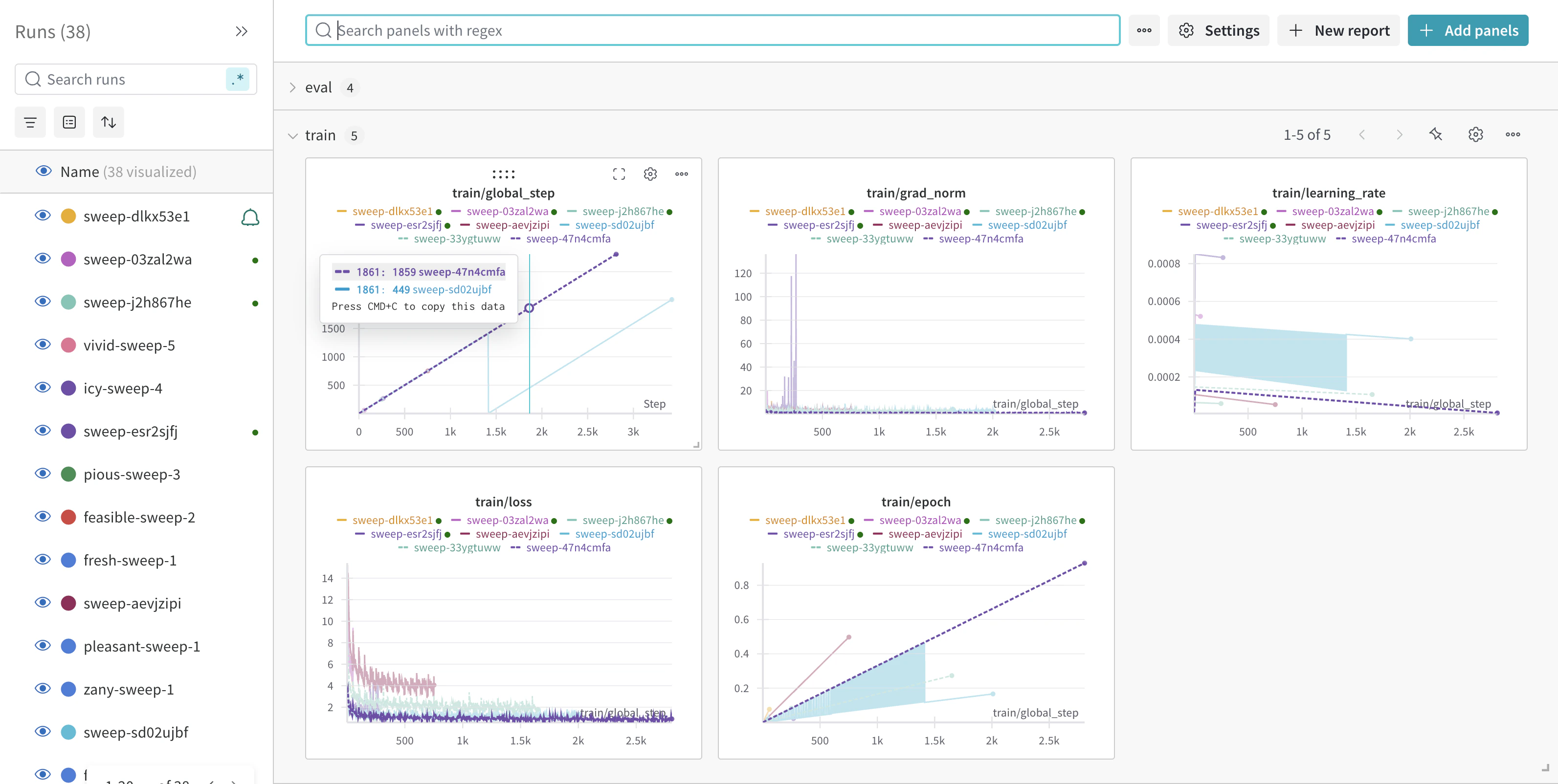
Cerebrium Runs Monitor training progress in the W&B dashboard: Hugging Face Token

Next Steps

  1. Export model:
    • Copy to AWS S3 using Boto3
    • Download locally using Cerebrium Python package
  2. Quality assurance:
  3. Deployment:
    • Create inference endpoint
    • Load model directly from Cerebrium volume

Conclusion

Combining W&B for tracking and Cerebrium for serverless compute enables efficient hyperparameter sweeps for Llama 3.2, optimizing model performance with minimal effort. View the complete code in the GitHub repository