Documentation Index
Fetch the complete documentation index at: https://cerebrium.ai/docs/llms.txt
Use this file to discover all available pages before exploring further.
This tutorial deploys a Vision Language Model (VLM) using SGLang on Cerebrium. A VLM combines a large language model (LLM) with a vision encoder, enabling it to understand and process both images and text.
The example builds an intelligent ad analysis system that evaluates advertisements across multiple dimensions, scoring how the advertisement relates to the business in question and how it performs on the given criteria.
SGLang (Structured Generation Language) differs from other inference frameworks such as vLLM and TensorRT by focusing no structed generation and complex workflows multi-step LLM workflows. SGLang is being used in production by teams at xAI and Deepseek to power their core language model capabilities making it a trusted choice.
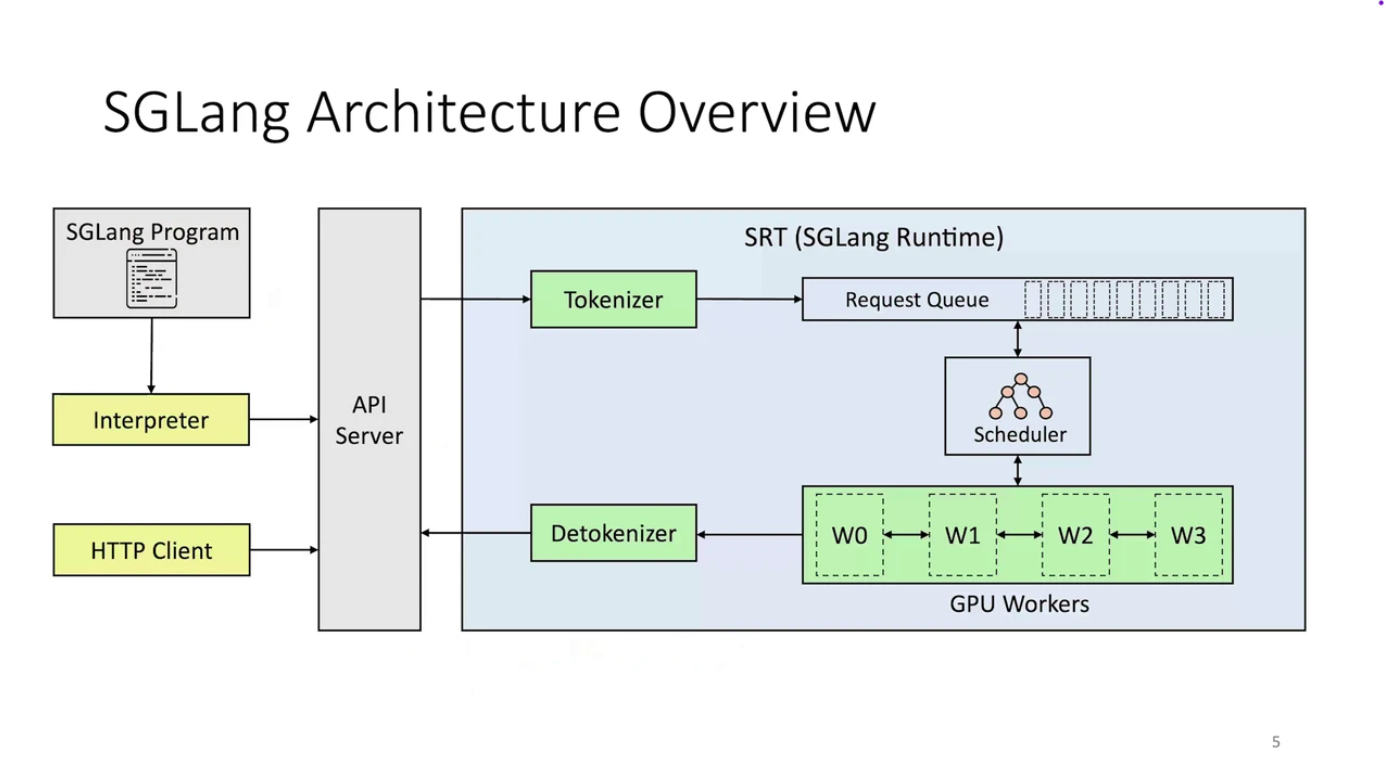
SGLang Architecture
SGLang isn’t just a domain-specific language (DSL). It’s a complete, integrated execution system with a clear separation of functionality:
| Layer | What it does | Why it matters |
|---|
| Frontend | Where you define your LLM logic (with gen, fork, join, etc.) | This keeps your code clean, readable, and your workflows easily reusable. |
| Backend | Where SGLang intelligently figures out how to run your logic most efficiently. | This is where the speed, scalability, and optimized inference truly come to life. |
Here are some frontend primitives for creating multi-step workflows:
| Primitive | What it does | Example |
|---|
gen() | Generates a text span | gen("title", stop="\n") |
fork() | Splits execution into multiple branches | For parallel sub-tasks |
join() | Merges branches back together | For combining outputs |
select() | Chooses one option from many | For controlled logic, like multiple choice |
Here is a summary of key advantages over traditional inference engines
| Feature | Traditional Engines (vLLM, TGI) | SGLang |
|---|
| Programming Model | Sequential API calls with manual prompt chaining | Native structured logic with gen(), fork(), join(), select() |
| Memory Management | Basic KV caching, often discarded between calls | RadixAttention: Intelligent prefix-aware cache reuse (up to 6x faster) |
| Output Control | Hope and pray for correct formatting | Compressed FSMs: Guaranteed structured output (JSON, XML, etc.) |
| Parallel Processing | Manual batching and coordination | Built-in fork() and join() for parallel execution |
| Performance | Standard inference optimization | PyTorch-native with torch.compile(), quantization, sparse inference |
For more details, see this article.
You can see the final code sample here
Tutorial
Step 1: Project Setup
Create the project structure:
cerebrium init 7-vision-language-sglang
cd 7-vision-language-sglang
The VLM is Qwen3-VL-30B-A3B-Instruct-FP8, which requires significant GPU memory. The cerebrium.toml defines the environment, hardware, and scaling settings. This configuration uses an ADA_L40 GPU and includes:
- Hardware settings for GPU, CPU, and memory allocation
- Scaling parameters to control instance counts
- Required pip packages: SGLang, flashinfer (the chosen backend), and PyTorch
- APT system dependencies
- FastAPI server configuration for hosting the API
For a complete reference of all available TOML settings, see the TOML Reference.
This example uses flashinfer as the backend, but other options like flash attention are also available.
Update cerebrium.toml with:
[cerebrium.deployment]
name = "7-vision-language-sglang"
python_version = "3.11"
docker_base_image_url = "nvidia/cuda:12.8.0-devel-ubuntu22.04"
deployment_initialization_timeout = 860
[cerebrium.hardware]
cpu = 6.0
memory = 60.0
compute = "ADA_L40"
[cerebrium.scaling]
min_replicas = 0
max_replicas = 2
[cerebrium.build]
use_uv = true
[cerebrium.dependencies.pip]
transformers = "latest"
huggingface_hub = "latest"
pydantic = "latest"
pillow = "latest"
requests = "latest"
torch = "latest"
"sglang[all]" = "latest"
"sgl-kernel" = "latest"
"flashinfer-python" = "latest"
[cerebrium.dependencies.apt]
libnuma-dev = "latest"
[cerebrium.runtime.custom]
port = 8000
entrypoint = ["uvicorn", "main:app", "--host", "0.0.0.0", "--port", "8000"]
Step 3: Implement the Ad Analysis Logic
Cerebrium does not enforce any special class design or application architecture — write Python code as if running locally. The code below sets up the SGLang Runtime Engine (Backend) with FastAPI and loads the model on container startup. The first request incurs a model load, but subsequent requests execute instantaneously.
In your main.py file:
import sglang as sgl
from sglang import function
from fastapi import FastAPI, HTTPException
from transformers import AutoProcessor
app = FastAPI(title="Vision Language SGLang API")
model_path = "Qwen/Qwen3-VL-30B-A3B-Instruct-FP8"
processor = AutoProcessor.from_pretrained(model_path)
@app.on_event("startup")
def _startup_warmup():
# Initialize engine on main thread during app startup
runtime = sgl.Runtime(
model_path=model_path,
enable_multimodal=True,
mem_fraction_static=0.8,
tp_size=1,
attention_backend="flashinfer",
)
runtime.endpoint.chat_template = sgl.lang.chat_template.get_chat_template(
"qwen2-vl"
)
sgl.set_default_backend(runtime)
@app.get("/health")
def health():
return {
"status": "healthy",
}
To score the advertisement, the code uses one of SGLang’s core differentiators: fork, which runs many prompts in parallel and brings the results together. This enables many simultaneous evaluations with no increase in total latency. The results are then structured in a specific format for the response.
@function
def analyze_ad(s, image, ad_description, dimensions):
s += sgl.system("Evaluate an advertisement about an company's description.")
s += sgl.user(sgl.image(image) + "Company Description: " + ad_description)
s += sgl.assistant("Sure!")
s += sgl.user("Is the company description related to the image?")
s += sgl.assistant(sgl.select("related", choices=["yes", "no"]))
if s["related"] == "no":
return
forks = s.fork(len(dimensions))
for i, (f, dim) in enumerate(zip(forks, dimensions)):
f += sgl.user("Evaluate based on the following dimension: " +
dim + ". End your judgment with the word 'END'")
# Use unique slot names per dimension to avoid collisions
f += sgl.assistant("Judgment: " + sgl.gen(f"judgment_{i}", stop="END"))
s += sgl.user("Provide a one-sentence synthesis of the overall evaluation, then we will output JSON.")
s += sgl.assistant(sgl.gen("summary_one_liner", stop="."))
schema = r'^\{"summary": ".{1,400}", "grade": "[ABCD][+\-]?"\}$'
s += sgl.user("Return only a 3 line parapgrah JSON object with keys summary and grade (A, B, C, D, +, -), where summary briefly synthesizes the above judgments.")
s += sgl.assistant(sgl.gen("output", regex=schema))
Bring it all together in an endpoint:
from pydantic import BaseModel
import base64
import io
import json
from PIL import Image
class AnalyzeRequest(BaseModel):
image_base64: str
ad_description: str
dimensions: list
def process_image(image_base64: str) -> Image.Image:
image_data = base64.b64decode(image_base64)
return Image.open(io.BytesIO(image_data))
@app.post("/analyze")
def analyze_advertisement(req: AnalyzeRequest):
try:
image = process_image(req.image_base64)
state = analyze_ad.run(image, req.ad_description, req.dimensions)
try:
print(state)
output = state["output"]
except KeyError:
output = None
if isinstance(output, str):
start = output.find("{")
end = output.rfind("}") + 1
if start != -1 and end > start:
return {
"success": True,
"analysis": json.loads(output[start:end]),
"dimensions_evaluated": req.dimensions
}
return {
"success": True,
"analysis": output,
"dimensions_evaluated": req.dimensions
}
except Exception as e:
raise HTTPException(status_code=500, detail=str(e))
Deploy the application to create a scalable inference endpoint.
Step 4: Deploy Your Application
Run:
Once deployed, test with a sample request:
curl -X POST "https://api.aws.us-east-1.cerebrium.ai/v4/p-<YOUR-PROJECT-ID>/7-vision-language-sglang/analyze" \
-H "Content-Type: application/json" \
-d '{
"company_description": "Nike is a global leader in athletic footwear, apparel, and sports equipment known for its innovative designs and the iconic “swoosh” logo. The brand embodies performance, style, and inspiration, empowering athletes worldwide to Just Do It."",
"image_base64": "<BASE64_ENCODED_IMAGE>",
"dimensions": ["Effectiveness","Clarity", "Appeal","Credibility"]
}'
Example Response
{
"success": true,
"analysis": {
"summary": "The company description is relevant to the image because it accurately reflects Nike's branding, which is showcased through the advertised sneaker and logo. The ad promotes Nike's core products—athletic footwear—and its values of performance, style, and inspiration, aligning with the brand's identity. The collaboration with a superhero theme further emphasizes innovation and empowerment, core ",
"grade": "A"
},
"dimensions_evaluated": ["Effectiveness", "Clarity", "Appeal", "Credibility"]
}
This example demonstrates how to leverage SGLang’s structured generation capabilities to build an ad analysis system, using features like fork() for parallel processing and SGLang’s built-in output control.
You can find the complete code for this tutorial in our examples repository.