> ## Documentation Index
> Fetch the complete documentation index at: https://cerebrium.ai/docs/llms.txt
> Use this file to discover all available pages before exploring further.
# Hyperparameter Sweep training Llama 3.2 with WandB
> Run a hyperparameter sweep on Llama 3.2 with WandB
Hyperparameter sweeps systematically test parameter combinations to find the best-performing model for the least compute or training time.
This tutorial covers training Llama 3.2, using [Wandb](https://wandb.ai/site) (Weights and Biases) to run hyperparameter sweeps and Cerebrium to scale experiments across serverless GPUs.
View the final version [on GitHub](https://github.com/CerebriumAI/examples/tree/master/12-training/1-wandb-sweep).
Read this section if you're unfamiliar with sweeps.
### Analogy: Pizza Topping Sweep
Forget about ML for a second. Imagine making pizzas to discover the best combination of toppings. Three variables are available:
• **Type of Cheese** (mozzarella, cheddar, parmesan)
• **Type of Sauce** (tomato, pesto)
• **Extra Topping** (pepperoni, mushrooms, olives)
There are 12 possible combinations. One of them will taste the best.
To find the tastiest pizza, try all combinations and rate them. This process is a **hyperparameter sweep**. The three hyperparameters are cheese, sauce, and extra topping.
One pizza at a time takes hours. With 12 ovens, all pizzas bake at once and the best one emerges in minutes.
If a kitchen is a GPU, 12 GPUs run all experiments in parallel. Cerebrium enables sweeps across 12 GPUs (or 1,000) to find the best model version fast.
### Setup Cerebrium
If you don’t have a Cerebrium account, run the following:
```bash theme={null}
pip install cerebrium --upgrade
cerebrium login
cerebrium init wandb-sweep
```
This creates a folder with two files:
* **main.py** - The entrypoint file where application code lives.
* **cerebrium.toml** - A configuration file for build and environment settings.
The rest of this tutorial continues in this folder.
### Setup Wandb
**Weights & Biases (Wandb)** tracks, visualizes, and manages machine learning experiments in real-time. It logs hyperparameters, metrics, and results for comparing models and optimizing performance.
1. [Sign up](https://wandb.ai/site) for a free account and then log in to your wandb account by running the following in your CLI.
```
pip install wandb
wandb login
```
A link prints in the terminal — click it and copy the API key back into the terminal.
Add the W\&B API key to Cerebrium secrets. In the [Cerebrium Dashboard](https://dashboard.cerebrium.ai/), navigate to the “secrets” tab in the left sidebar. Add the following:
* **Key**: WANDB\_API\_KEY
* **Value**: The value you copied from the Wandb website.
Click the “Save All Changes” button.
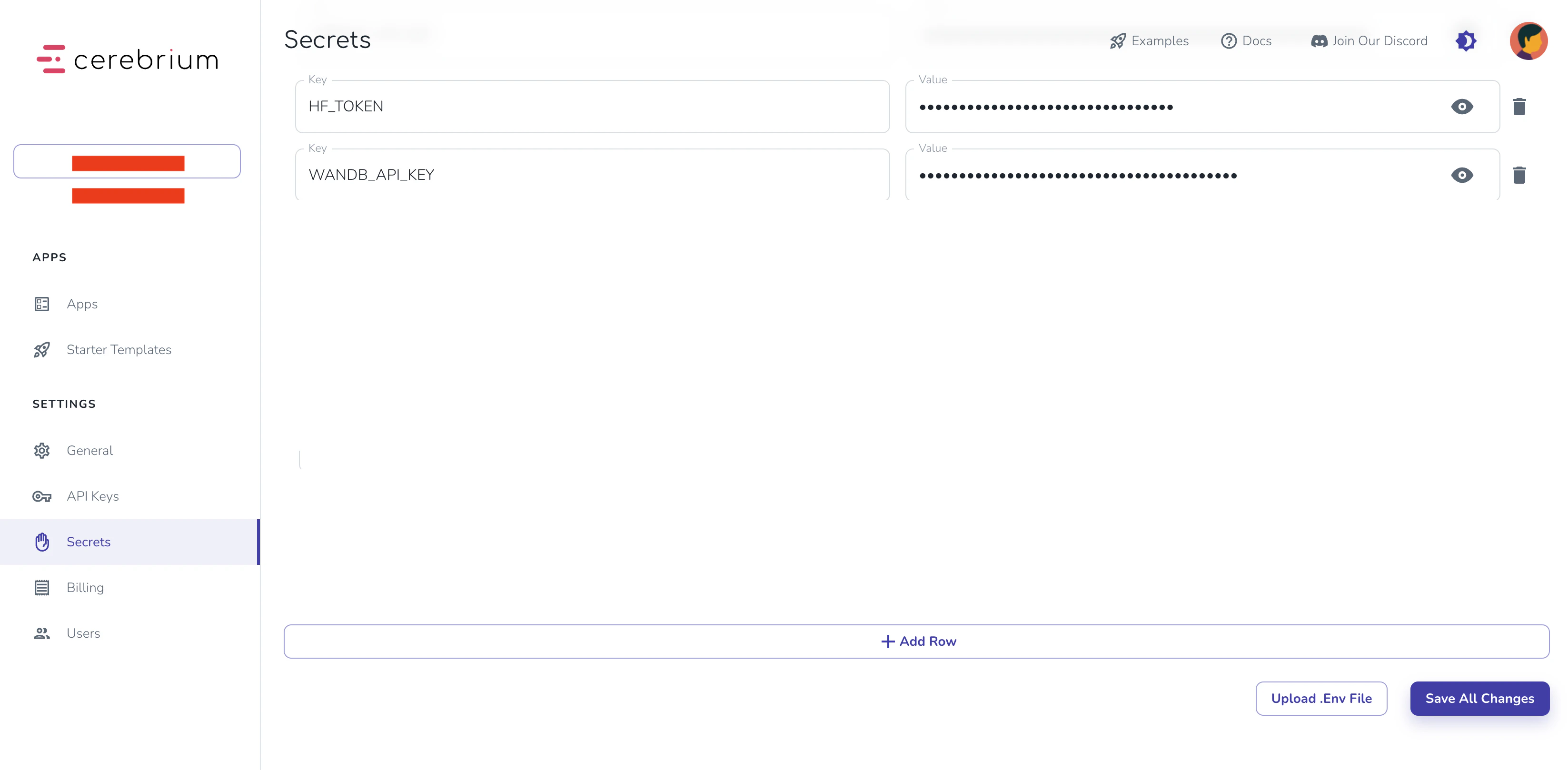 Wandb authentication is now complete.
### Training Script
To train with Llama 3.2, you'll need:
1. Model access permission:
* Visit the [Llama 3.2 model page](https://huggingface.co/meta-llama/Llama-3.2-3B-Instruct) on Hugging Face
* Accept all permissions
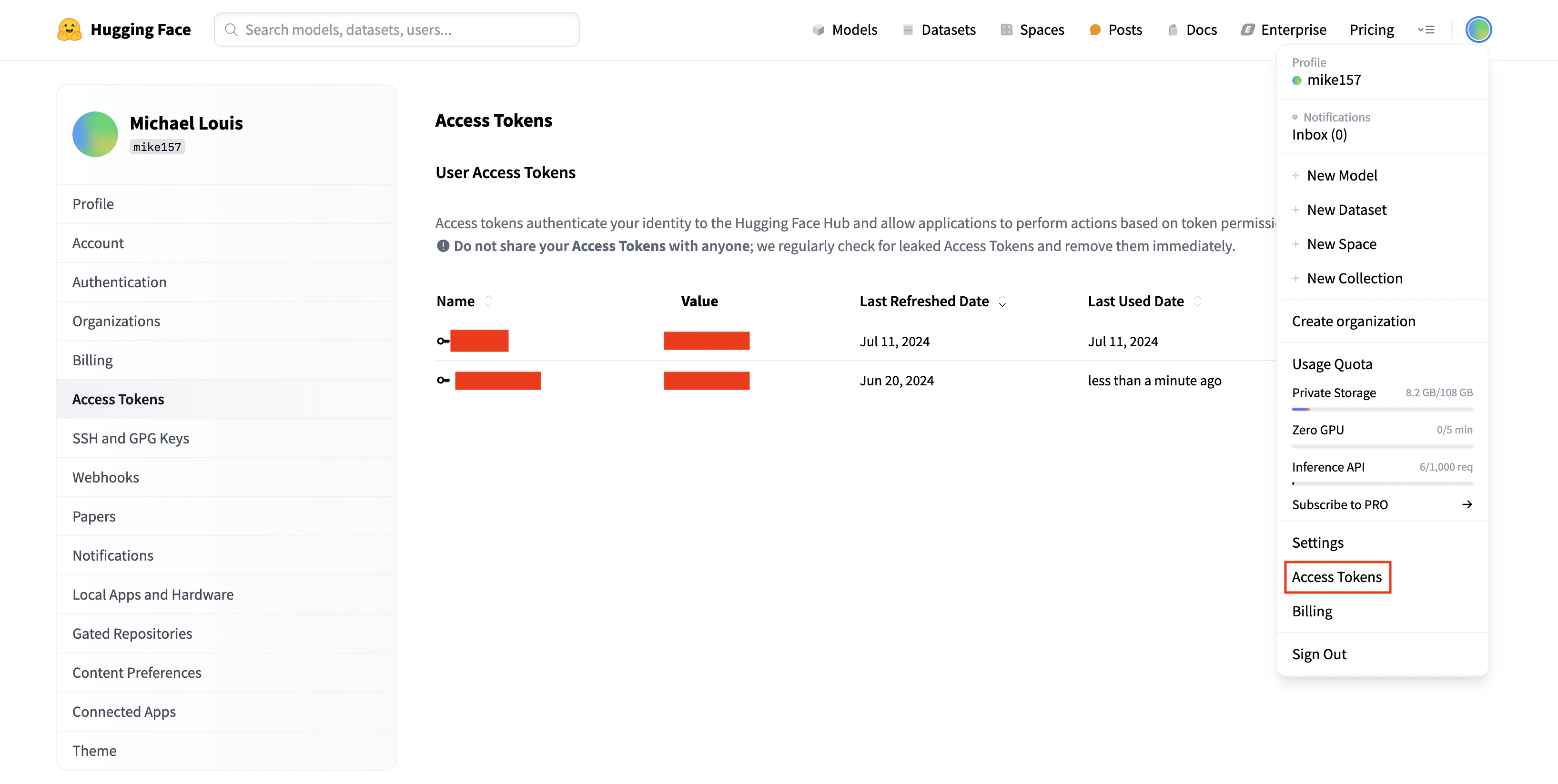
2. Hugging Face token:
* Click your profile image (top right)
* Select "Access token"
* Create a new token if needed
* Add to Cerebrium Secrets:
* Key: `HF_TOKEN`
* Value: Your Hugging Face token
* Click "Save All Changes"
Wandb authentication is now complete.
### Training Script
To train with Llama 3.2, you'll need:
1. Model access permission:
* Visit the [Llama 3.2 model page](https://huggingface.co/meta-llama/Llama-3.2-3B-Instruct) on Hugging Face
* Accept all permissions
2. Hugging Face token:
* Click your profile image (top right)
* Select "Access token"
* Create a new token if needed
* Add to Cerebrium Secrets:
* Key: `HF_TOKEN`
* Value: Your Hugging Face token
* Click "Save All Changes"
 The training script adapts [this Kaggle notebook](https://www.kaggle.com/code/scratchpad/notebookad2fe9fab1/edit).
Create a `requirements.txt` file with these dependencies:
```
transformers
datasets
accelerate
peft
trl
bitsandbytes
wandb
```
These packages are required both locally and on Cerebrium. Update your `cerebrium.toml` to include:
* The requirements.txt path
* Hardware requirements for training
* A 1-hour max timeout using `response_grace_period`
Add this configuration:
```
#existing configuration
[cerebrium.hardware]
cpu = 6
memory = 30.0
compute = "ADA_L40"
[cerebrium.scaling]
#existing configuration
response_grace_period = 3600
[cerebrium.dependencies.paths]
pip = "requirements.txt"
```
Install the dependencies locally:
```bash theme={null}
pip install -r requirements.txt
```
Add this code to `main.py`:
```python theme={null}
import os
from typing import Dict
import wandb
from transformers import (
AutoModelForCausalLM,
AutoTokenizer,
BitsAndBytesConfig,
TrainingArguments,
)
from peft import LoraConfig, get_peft_model
from datasets import load_dataset
from trl import SFTTrainer, setup_chat_format
import torch
import bitsandbytes as bnb
from huggingface_hub import login
login(token=os.getenv("HF_TOKEN"))
def find_all_linear_names(model):
cls = bnb.nn.Linear4bit
lora_module_names = set()
for name, module in model.named_modules():
if isinstance(module, cls):
names = name.split('.')
lora_module_names.add(names[0] if len(names) == 1 else names[-1])
if 'lm_head' in lora_module_names:
lora_module_names.remove('lm_head')
return list(lora_module_names)
def train_model(params: Dict):
"""
Training function that receives parameters from the Cerebrium endpoint
"""
# Initialize wandb
wandb.login(key=os.getenv("WANDB_API_KEY"))
wandb.init(
project=params.get("wandb_project", "Llama-3.2-Customer-Support"),
name=params.get("run_name", None),
config=params,
)
# Model configuration
base_model = params.get("base_model", "meta-llama/Llama-3.2-3B-Instruct")
new_model = params.get("output_model_name", f"/persistent-storage/llama-3.2-3b-it-Customer-Support-{wandb.run.id}")
# Set torch dtype and attention implementation
torch_dtype = torch.bfloat16 if torch.cuda.get_device_capability()[0] >= 8 else torch.float16
attn_implementation = "eager"
# QLoRA config
bnb_config = BitsAndBytesConfig(
load_in_4bit=True,
bnb_4bit_quant_type="nf4",
bnb_4bit_compute_dtype=torch_dtype,
bnb_4bit_use_double_quant=True,
)
# Load model and tokenizer
model = AutoModelForCausalLM.from_pretrained(
base_model,
quantization_config=bnb_config,
device_map="auto",
attn_implementation=attn_implementation
)
tokenizer = AutoTokenizer.from_pretrained(base_model, trust_remote_code=True)
# Find linear modules
modules = find_all_linear_names(model)
# LoRA config
peft_config = LoraConfig(
r=params.get("lora_r", 16),
lora_alpha=params.get("lora_alpha", 32),
lora_dropout=params.get("lora_dropout", 0.05),
bias="none",
task_type="CAUSAL_LM",
target_modules=modules
)
# Setup model
tokenizer.chat_template = None # Clear existing chat template
model, tokenizer = setup_chat_format(model, tokenizer)
model = get_peft_model(model, peft_config)
# Load and prepare dataset
dataset = load_dataset(
params.get("dataset_name", "bitext/Bitext-customer-support-llm-chatbot-training-dataset"),
split="train"
)
dataset = dataset.shuffle(seed=params.get("seed", 65))
if params.get("max_samples"):
dataset = dataset.select(range(params.get("max_samples")))
instruction = params.get("instruction",
"""You are a top-rated customer service agent named John.
Be polite to customers and answer all their questions."""
)
def format_chat_template(row):
row_json = [
{"role": "system", "content": instruction},
{"role": "user", "content": row["instruction"]},
{"role": "assistant", "content": row["response"]}
]
row["text"] = tokenizer.apply_chat_template(row_json, tokenize=False)
return row
dataset = dataset.map(format_chat_template, num_proc=4)
dataset = dataset.train_test_split(test_size=params.get("test_size", 0.1))
# Training arguments
training_arguments = TrainingArguments(
output_dir=new_model,
per_device_train_batch_size=params.get("batch_size", 1),
per_device_eval_batch_size=params.get("batch_size", 1),
gradient_accumulation_steps=params.get("gradient_accumulation_steps", 2),
optim="paged_adamw_32bit",
num_train_epochs=params.get("epochs", 1),
eval_strategy="steps",
eval_steps=params.get("eval_steps", 0.2),
logging_steps=params.get("logging_steps", 1),
warmup_steps=params.get("warmup_steps", 10),
learning_rate=params.get("learning_rate", 2e-4),
fp16=params.get("fp16", False),
bf16=params.get("bf16", False),
group_by_length=params.get("group_by_length", True),
report_to="wandb"
)
# Initialize trainer
trainer = SFTTrainer(
model=model,
train_dataset=dataset["train"],
eval_dataset=dataset["test"],
peft_config=peft_config,
args=training_arguments,
)
# Train and save
model.config.use_cache = False
trainer.train()
model.config.use_cache = True
# Save model
trainer.model.save_pretrained(new_model)
wandb.finish()
return {"status": "success", "model_path": new_model}
```
You can read a deeper explanation of the training script [here](https://www.datacamp.com/tutorial/fine-tuning-llama-3-2) but here's a high-level explanation of the code in bullet points:
* This code sets up a fine-tuning pipeline for a Large Language Model (specifically Llama 3.2) using several modern training techniques:
* Takes a dictionary of parameters for flexible training configurations — the hyperparameter sweep.
* Loads a customer support dataset from Hugging Face and formats it into chat template format
* Implements QLoRA (Quantized Low-Rank Adaptation) for efficient fine-tuning.
* Uses Weights & Biases (Wandb) for experiment tracking, logging results to the Wandb dashboard.
* Saves the final model to a Cerebrium volume and returns a “success” message.
Deploy the training endpoint:
```bash theme={null}
cerebrium deploy
```
This command:
1. Sets up the environment with required packages
2. Deploys the training script as an endpoint
3. Returns a POST URL (save this for later)
Cerebrium requires no special decorators or syntax — wrap the training code in a function. The endpoint automatically scales based on request volume, making it ideal for hyperparameter sweeps.
### Hyperparameter Sweep
Create a **run.py** file for running locally. Add the following code:
```python theme={null}
import wandb
import requests
import os
from typing import Dict, Any
from dotenv import load_dotenv
load_dotenv()
CEREBRIUM_API_KEY = os.getenv("CEREBRIUM_API_KEY")
ENDPOINT_URL = "https://api.cerebrium.ai/v4/p-xxxxxxxx/wandb-sweep/train_model?async=true"
def train_with_params(params: Dict[str, Any]):
"""
Send training parameters to Cerebrium endpoint
"""
headers = {
"Authorization": f"Bearer {CEREBRIUM_API_KEY}",
"Content-Type": "application/json"
}
response = requests.post(ENDPOINT_URL, json={"params": params}, headers=headers)
if response.status_code != 202:
raise Exception(f"Training failed: {response.text}")
return response.json()
# Define the sweep configuration
sweep_config = {
"method": "bayes", # Bayesian optimization
"metric": {
"name": "eval/loss",
"goal": "minimize"
},
"parameters": {
"learning_rate": {
"distribution": "log_uniform",
"min": -10, # exp(-10) ≈ 4.54e-5
"max": -7, # exp(-7) ≈ 9.12e-4
},
"batch_size": {
"values": [1, 2, 4]
},
"gradient_accumulation_steps": {
"values": [2, 4, 8]
},
"lora_r": {
"values": [8, 16, 32]
},
"lora_alpha": {
"values": [16, 32, 64]
},
"lora_dropout": {
"distribution": "uniform",
"min": 0.01,
"max": 0.1
},
"max_seq_length": {
"values": [512, 1024]
}
}
}
def main():
# Initialize the sweep
sweep_id = wandb.sweep(sweep_config, project="Llama-3.2-Customer-Support")
def sweep_iteration():
# Initialize a new W&B run
with wandb.init() as run:
# Get the parameters for this run
params = wandb.config.as_dict()
# Add any fixed parameters
params.update({
"wandb_project": "Llama-3.2-Customer-Support",
"base_model": "meta-llama/Llama-3.2-3B-Instruct",
"dataset_name": "bitext/Bitext-customer-support-llm-chatbot-training-dataset",
"run_name": f"sweep-{run.id}",
"epochs": 1,
"test_size": 0.1,
})
# Call the Cerebrium endpoint with these parameters
try:
result = train_with_params(params)
print(f"Training completed: {result}")
except Exception as e:
print(f"Training failed: {str(e)}")
run.finish(exit_code=1)
# Run the sweep
wandb.agent(sweep_id, function=sweep_iteration, count=10) # Run 10 experiments
if __name__ == "__main__":
main()
```
This code implements a hyperparameter sweep using Wandb sweeps to train a Llama 3.2 model for customer support. Here's what it does:
* Create a .env file and add the Inference API key from the Cerebrium Dashboard.
```
CEREBRIUM_API_KEY=eyJ....
```
* Update the Cerebrium endpoint with the correct project ID and function name. The URL is appended with “?async=true”. This makes it a fire-and-forget request that can run up to 12 hours. Read more [here](https://docs.cerebrium.ai/endpoints/async).
* The Bayesian optimization sweep configuration searches through these hyperparameters:
* Learning rate (log uniform distribution between \~4.54e-5 and \~9.12e-4)
* Batch size (1, 2, or 4)
* Gradient accumulation steps (2, 4, or 8)
* LoRA parameters (r, alpha, and dropout)
* Maximum sequence length (512 or 1024)
* The sweep is created in the "Llama-3.2-Customer-Support" W\&B project
* For each sweep iteration:
* Initializes a new W\&B run
* Combines the sweep's hyperparameters with fixed parameters (like model name and dataset)
* Sends the parameters to a Cerebrium endpoint for training that happens asynchronously.
* Logs the results back to W\&B
* Runs 10 experiments (10 concurrent GPUs is the limit on Cerebrium’s Hobby plan)
Run the script:
```bash theme={null}
python run.py
```
Monitor training progress in the W\&B dashboard:
The training script adapts [this Kaggle notebook](https://www.kaggle.com/code/scratchpad/notebookad2fe9fab1/edit).
Create a `requirements.txt` file with these dependencies:
```
transformers
datasets
accelerate
peft
trl
bitsandbytes
wandb
```
These packages are required both locally and on Cerebrium. Update your `cerebrium.toml` to include:
* The requirements.txt path
* Hardware requirements for training
* A 1-hour max timeout using `response_grace_period`
Add this configuration:
```
#existing configuration
[cerebrium.hardware]
cpu = 6
memory = 30.0
compute = "ADA_L40"
[cerebrium.scaling]
#existing configuration
response_grace_period = 3600
[cerebrium.dependencies.paths]
pip = "requirements.txt"
```
Install the dependencies locally:
```bash theme={null}
pip install -r requirements.txt
```
Add this code to `main.py`:
```python theme={null}
import os
from typing import Dict
import wandb
from transformers import (
AutoModelForCausalLM,
AutoTokenizer,
BitsAndBytesConfig,
TrainingArguments,
)
from peft import LoraConfig, get_peft_model
from datasets import load_dataset
from trl import SFTTrainer, setup_chat_format
import torch
import bitsandbytes as bnb
from huggingface_hub import login
login(token=os.getenv("HF_TOKEN"))
def find_all_linear_names(model):
cls = bnb.nn.Linear4bit
lora_module_names = set()
for name, module in model.named_modules():
if isinstance(module, cls):
names = name.split('.')
lora_module_names.add(names[0] if len(names) == 1 else names[-1])
if 'lm_head' in lora_module_names:
lora_module_names.remove('lm_head')
return list(lora_module_names)
def train_model(params: Dict):
"""
Training function that receives parameters from the Cerebrium endpoint
"""
# Initialize wandb
wandb.login(key=os.getenv("WANDB_API_KEY"))
wandb.init(
project=params.get("wandb_project", "Llama-3.2-Customer-Support"),
name=params.get("run_name", None),
config=params,
)
# Model configuration
base_model = params.get("base_model", "meta-llama/Llama-3.2-3B-Instruct")
new_model = params.get("output_model_name", f"/persistent-storage/llama-3.2-3b-it-Customer-Support-{wandb.run.id}")
# Set torch dtype and attention implementation
torch_dtype = torch.bfloat16 if torch.cuda.get_device_capability()[0] >= 8 else torch.float16
attn_implementation = "eager"
# QLoRA config
bnb_config = BitsAndBytesConfig(
load_in_4bit=True,
bnb_4bit_quant_type="nf4",
bnb_4bit_compute_dtype=torch_dtype,
bnb_4bit_use_double_quant=True,
)
# Load model and tokenizer
model = AutoModelForCausalLM.from_pretrained(
base_model,
quantization_config=bnb_config,
device_map="auto",
attn_implementation=attn_implementation
)
tokenizer = AutoTokenizer.from_pretrained(base_model, trust_remote_code=True)
# Find linear modules
modules = find_all_linear_names(model)
# LoRA config
peft_config = LoraConfig(
r=params.get("lora_r", 16),
lora_alpha=params.get("lora_alpha", 32),
lora_dropout=params.get("lora_dropout", 0.05),
bias="none",
task_type="CAUSAL_LM",
target_modules=modules
)
# Setup model
tokenizer.chat_template = None # Clear existing chat template
model, tokenizer = setup_chat_format(model, tokenizer)
model = get_peft_model(model, peft_config)
# Load and prepare dataset
dataset = load_dataset(
params.get("dataset_name", "bitext/Bitext-customer-support-llm-chatbot-training-dataset"),
split="train"
)
dataset = dataset.shuffle(seed=params.get("seed", 65))
if params.get("max_samples"):
dataset = dataset.select(range(params.get("max_samples")))
instruction = params.get("instruction",
"""You are a top-rated customer service agent named John.
Be polite to customers and answer all their questions."""
)
def format_chat_template(row):
row_json = [
{"role": "system", "content": instruction},
{"role": "user", "content": row["instruction"]},
{"role": "assistant", "content": row["response"]}
]
row["text"] = tokenizer.apply_chat_template(row_json, tokenize=False)
return row
dataset = dataset.map(format_chat_template, num_proc=4)
dataset = dataset.train_test_split(test_size=params.get("test_size", 0.1))
# Training arguments
training_arguments = TrainingArguments(
output_dir=new_model,
per_device_train_batch_size=params.get("batch_size", 1),
per_device_eval_batch_size=params.get("batch_size", 1),
gradient_accumulation_steps=params.get("gradient_accumulation_steps", 2),
optim="paged_adamw_32bit",
num_train_epochs=params.get("epochs", 1),
eval_strategy="steps",
eval_steps=params.get("eval_steps", 0.2),
logging_steps=params.get("logging_steps", 1),
warmup_steps=params.get("warmup_steps", 10),
learning_rate=params.get("learning_rate", 2e-4),
fp16=params.get("fp16", False),
bf16=params.get("bf16", False),
group_by_length=params.get("group_by_length", True),
report_to="wandb"
)
# Initialize trainer
trainer = SFTTrainer(
model=model,
train_dataset=dataset["train"],
eval_dataset=dataset["test"],
peft_config=peft_config,
args=training_arguments,
)
# Train and save
model.config.use_cache = False
trainer.train()
model.config.use_cache = True
# Save model
trainer.model.save_pretrained(new_model)
wandb.finish()
return {"status": "success", "model_path": new_model}
```
You can read a deeper explanation of the training script [here](https://www.datacamp.com/tutorial/fine-tuning-llama-3-2) but here's a high-level explanation of the code in bullet points:
* This code sets up a fine-tuning pipeline for a Large Language Model (specifically Llama 3.2) using several modern training techniques:
* Takes a dictionary of parameters for flexible training configurations — the hyperparameter sweep.
* Loads a customer support dataset from Hugging Face and formats it into chat template format
* Implements QLoRA (Quantized Low-Rank Adaptation) for efficient fine-tuning.
* Uses Weights & Biases (Wandb) for experiment tracking, logging results to the Wandb dashboard.
* Saves the final model to a Cerebrium volume and returns a “success” message.
Deploy the training endpoint:
```bash theme={null}
cerebrium deploy
```
This command:
1. Sets up the environment with required packages
2. Deploys the training script as an endpoint
3. Returns a POST URL (save this for later)
Cerebrium requires no special decorators or syntax — wrap the training code in a function. The endpoint automatically scales based on request volume, making it ideal for hyperparameter sweeps.
### Hyperparameter Sweep
Create a **run.py** file for running locally. Add the following code:
```python theme={null}
import wandb
import requests
import os
from typing import Dict, Any
from dotenv import load_dotenv
load_dotenv()
CEREBRIUM_API_KEY = os.getenv("CEREBRIUM_API_KEY")
ENDPOINT_URL = "https://api.cerebrium.ai/v4/p-xxxxxxxx/wandb-sweep/train_model?async=true"
def train_with_params(params: Dict[str, Any]):
"""
Send training parameters to Cerebrium endpoint
"""
headers = {
"Authorization": f"Bearer {CEREBRIUM_API_KEY}",
"Content-Type": "application/json"
}
response = requests.post(ENDPOINT_URL, json={"params": params}, headers=headers)
if response.status_code != 202:
raise Exception(f"Training failed: {response.text}")
return response.json()
# Define the sweep configuration
sweep_config = {
"method": "bayes", # Bayesian optimization
"metric": {
"name": "eval/loss",
"goal": "minimize"
},
"parameters": {
"learning_rate": {
"distribution": "log_uniform",
"min": -10, # exp(-10) ≈ 4.54e-5
"max": -7, # exp(-7) ≈ 9.12e-4
},
"batch_size": {
"values": [1, 2, 4]
},
"gradient_accumulation_steps": {
"values": [2, 4, 8]
},
"lora_r": {
"values": [8, 16, 32]
},
"lora_alpha": {
"values": [16, 32, 64]
},
"lora_dropout": {
"distribution": "uniform",
"min": 0.01,
"max": 0.1
},
"max_seq_length": {
"values": [512, 1024]
}
}
}
def main():
# Initialize the sweep
sweep_id = wandb.sweep(sweep_config, project="Llama-3.2-Customer-Support")
def sweep_iteration():
# Initialize a new W&B run
with wandb.init() as run:
# Get the parameters for this run
params = wandb.config.as_dict()
# Add any fixed parameters
params.update({
"wandb_project": "Llama-3.2-Customer-Support",
"base_model": "meta-llama/Llama-3.2-3B-Instruct",
"dataset_name": "bitext/Bitext-customer-support-llm-chatbot-training-dataset",
"run_name": f"sweep-{run.id}",
"epochs": 1,
"test_size": 0.1,
})
# Call the Cerebrium endpoint with these parameters
try:
result = train_with_params(params)
print(f"Training completed: {result}")
except Exception as e:
print(f"Training failed: {str(e)}")
run.finish(exit_code=1)
# Run the sweep
wandb.agent(sweep_id, function=sweep_iteration, count=10) # Run 10 experiments
if __name__ == "__main__":
main()
```
This code implements a hyperparameter sweep using Wandb sweeps to train a Llama 3.2 model for customer support. Here's what it does:
* Create a .env file and add the Inference API key from the Cerebrium Dashboard.
```
CEREBRIUM_API_KEY=eyJ....
```
* Update the Cerebrium endpoint with the correct project ID and function name. The URL is appended with “?async=true”. This makes it a fire-and-forget request that can run up to 12 hours. Read more [here](https://docs.cerebrium.ai/endpoints/async).
* The Bayesian optimization sweep configuration searches through these hyperparameters:
* Learning rate (log uniform distribution between \~4.54e-5 and \~9.12e-4)
* Batch size (1, 2, or 4)
* Gradient accumulation steps (2, 4, or 8)
* LoRA parameters (r, alpha, and dropout)
* Maximum sequence length (512 or 1024)
* The sweep is created in the "Llama-3.2-Customer-Support" W\&B project
* For each sweep iteration:
* Initializes a new W\&B run
* Combines the sweep's hyperparameters with fixed parameters (like model name and dataset)
* Sends the parameters to a Cerebrium endpoint for training that happens asynchronously.
* Logs the results back to W\&B
* Runs 10 experiments (10 concurrent GPUs is the limit on Cerebrium’s Hobby plan)
Run the script:
```bash theme={null}
python run.py
```
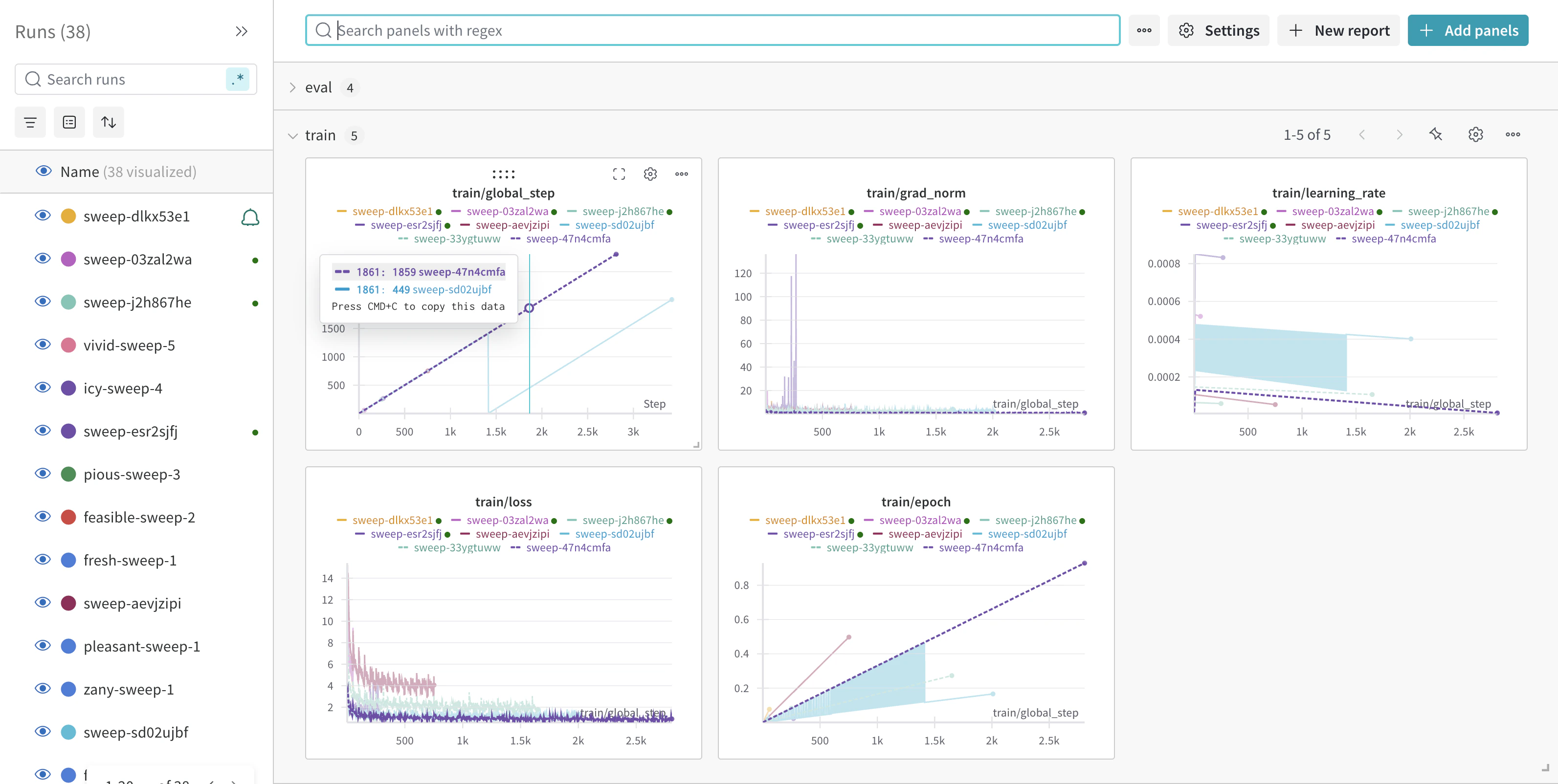
Monitor training progress in the W\&B dashboard:
 ### Next Steps
1. Export model:
* Copy to AWS S3 using Boto3
* Download locally using Cerebrium Python package
2. Quality assurance:
* Run CI/CD tests on model outputs
* Use Cerebrium's [webhook functionality](https://docs.cerebrium.ai/endpoints/webhook)
3. Deployment:
* Create inference endpoint
* Load model directly from Cerebrium volume
### Conclusion
Combining W\&B for tracking and Cerebrium for serverless compute enables efficient hyperparameter sweeps for Llama 3.2, optimizing model performance with minimal effort.
View the complete code in the [GitHub repository](https://github.com/CerebriumAI/examples/tree/master/12-training/1-wandb-sweep)
### Next Steps
1. Export model:
* Copy to AWS S3 using Boto3
* Download locally using Cerebrium Python package
2. Quality assurance:
* Run CI/CD tests on model outputs
* Use Cerebrium's [webhook functionality](https://docs.cerebrium.ai/endpoints/webhook)
3. Deployment:
* Create inference endpoint
* Load model directly from Cerebrium volume
### Conclusion
Combining W\&B for tracking and Cerebrium for serverless compute enables efficient hyperparameter sweeps for Llama 3.2, optimizing model performance with minimal effort.
View the complete code in the [GitHub repository](https://github.com/CerebriumAI/examples/tree/master/12-training/1-wandb-sweep)