> ## Documentation Index
> Fetch the complete documentation index at: https://cerebrium.ai/docs/llms.txt
> Use this file to discover all available pages before exploring further.
# Streaming LLM Output
> Stream outputs live from Falcon 7B using SSE
This example is only compatible with CLI v1.20 and later. Should you be making
use of an older version of the CLI, please run `pip install --upgrade
cerebrium` to upgrade it to the latest version.
This tutorial covers implementing streaming with Server-Sent Events (SSE) to return results as quickly as possible.
To see the final implementation, you can view it [here](https://github.com/CerebriumAI/examples/tree/master/2-advanced-concepts/5-streaming-endpoint)
## Basic Setup
Developing on Cerebrium is similar to a virtual machine or Google Colab. Install the Cerebrium package and log in before proceeding. See the [installation docs](https://docs.cerebrium.ai/getting-started/installation) for details.
First, create your project:
```
cerebrium init 5-streaming-endpoint
```
Add the following packages to the `[cerebrium.dependencies.pip]` section of your `cerebrium.toml` file:
```toml theme={null}
[cerebrium.dependencies.pip]
peft = "git+https://github.com/huggingface/peft.git"
transformers = "git+https://github.com/huggingface/transformers.git"
accelerate = "git+https://github.com/huggingface/accelerate.git"
bitsandbytes = "latest"
sentencepiece = "latest"
pydantic = "latest"
torch = "2.1.0"
```
Create a `main.py` file. This implementation fits in a single file. Start by defining the request object:
```python theme={null}
from pydantic import BaseModel
class Item(BaseModel):
prompt: str
cutoff_len: int
temperature: float
top_p: float
top_k: float
max_new_tokens: int
```
Pydantic handles data validation. The `prompt` parameter is required; others are optional with default values. A missing `prompt` triggers an automatic error message.
## Falcon Implementation
## Model Setup
```python theme={null}
from transformers import (
AutoModelForCausalLM,
AutoTokenizer,
GenerationConfig,
TextIteratorStreamer,
)
import torch
modal_path = "tiiuae/falcon-7b-instruct"
# Loading in base model and tokenizer
tokenizer = AutoTokenizer.from_pretrained(modal_path)
tokenizer.pad_token = tokenizer.eos_token
model = AutoModelForCausalLM.from_pretrained(
modal_path,
torch_dtype=torch.bfloat16,
trust_remote_code=True,
device_map="auto",
)
```
The tokenizer and model instantiate outside the `predict` function, ensuring model weights load only once at startup.
## Streaming Implementation
The `stream` function handles streaming results from the endpoint:
```python theme={null}
def stream(prompt, cutoff_len=256, temperature=0.8, top_p=0.75, top_k=40, max_new_tokens=250):
item = Item(
prompt=prompt,
cutoff_len=cutoff_len,
temperature=temperature,
top_p=top_p,
top_k=top_k,
max_new_tokens=max_new_tokens,
)
inputs = tokenizer(
item.prompt, return_tensors="pt", max_length=512, truncation=True, padding=True
)
input_ids = inputs["input_ids"].to("cuda")
streamer = TextIteratorStreamer(tokenizer)
generation_config = GenerationConfig(
temperature=item.temperature,
top_p=item.top_p,
top_k=item.top_k,
)
with torch.no_grad():
generation_kwargs = {
"input_ids": input_ids,
"generation_config": generation_config,
"return_dict_in_generate": True,
"output_scores": True,
"pad_token_id": tokenizer.eos_token_id,
"max_new_tokens": item.max_new_tokens,
"streamer": streamer,
}
model.generate(**generation_kwargs)
for text in streamer:
yield text # vital for streaming
```
The function receives inputs from the request object and uses `TextIteratorStreamer` to stream model output. The `yield` keyword returns output as it generates.
## Deploy
Configure your compute and environment settings in `cerebrium.toml`:
```toml theme={null}
[cerebrium.build]
predict_data = "{\"prompt\": \"Here is some example predict data for your config.yaml which will be used to test your predict function on build.\"}"
hide_public_endpoint = false
disable_animation = false
disable_build_logs = false
disable_syntax_check = false
disable_predict = false
log_level = "INFO"
disable_confirmation = false
[cerebrium.deployment]
name = "5-streaming-endpoint"
python_version = "3.11"
include = ["./*", "main.py", "cerebrium.toml"]
exclude = ["./example_exclude"]
docker_base_image_url = "nvidia/cuda:12.1.1-runtime-ubuntu22.04"
[cerebrium.hardware]
compute = "AMPERE_A10"
cpu = 2
memory = 16.0
gpu_count = 1
[cerebrium.scaling]
min_replicas = 0
max_replicas = 5
cooldown = 60
[cerebrium.dependencies.pip]
peft = "git+https://github.com/huggingface/peft.git"
transformers = "git+https://github.com/huggingface/transformers.git"
accelerate = "git+https://github.com/huggingface/accelerate.git"
bitsandbytes = "latest"
sentencepiece = "latest"
pydantic = "latest"
torch = "2.1.0"
[cerebrium.dependencies.conda]
[cerebrium.dependencies.apt]
```
Deploy the model using this command:
```bash theme={null}
cerebrium deploy streaming-falcon
```
After deployment, make this request:
The endpoint path should include `stream` since that is the function name.
```curl theme={null}
curl --location --request POST 'https://api.cerebrium.ai/v4/p-xxxxxxxx/5-streaming-endpoint/stream' \
--header 'Authorization: Bearer ' \
--header 'Content-Type: application/json' \
--data-raw '{
"prompt": "Tell me a story",
}'
```
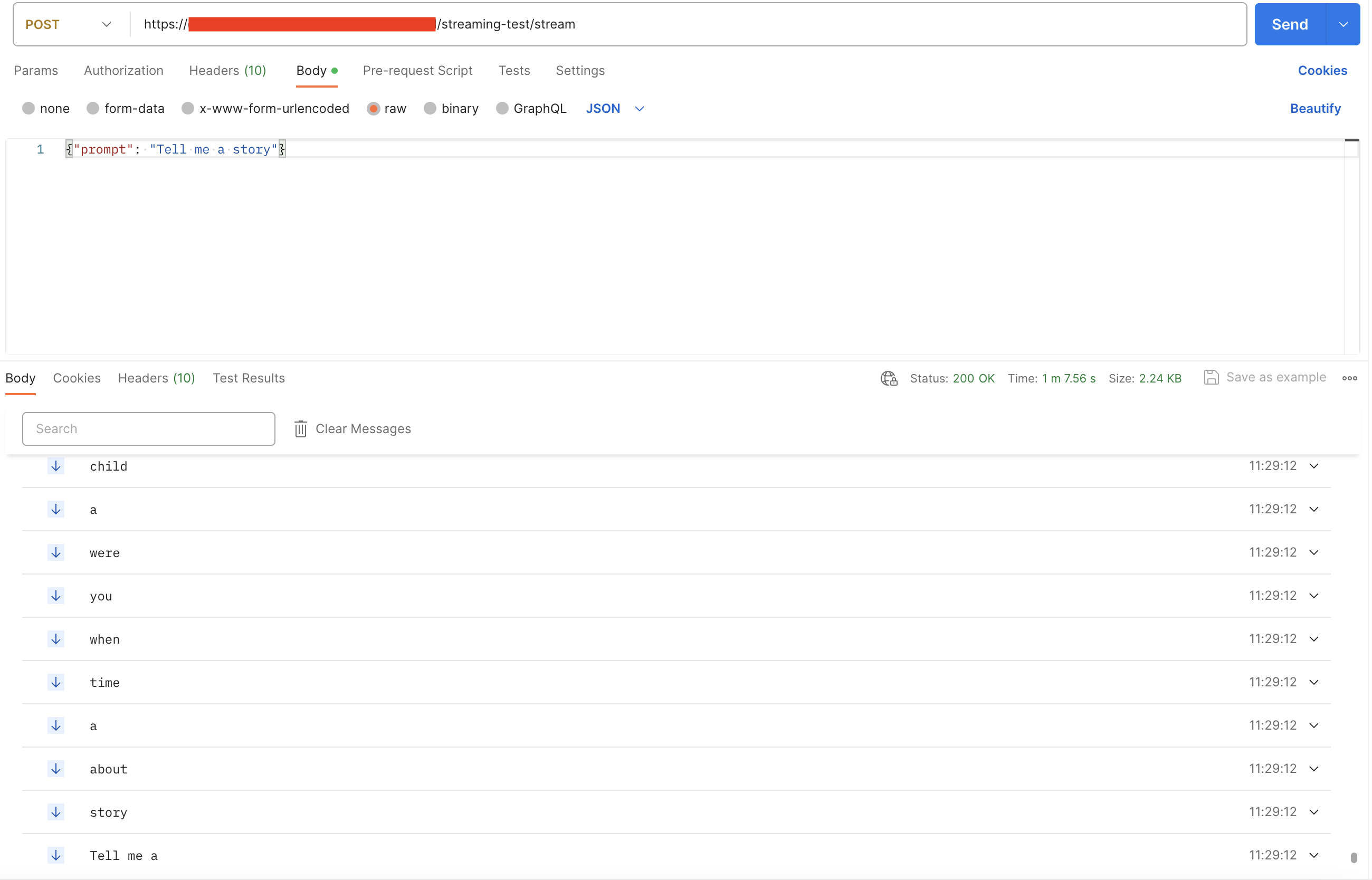
The model outputs as Server-Sent Events (SSE). Here's an example from Postman:
 ```
```
```
```