> ## Documentation Index
> Fetch the complete documentation index at: https://cerebrium.ai/docs/llms.txt
> Use this file to discover all available pages before exploring further.
# ComfyUI application at Scale
> Deploy a ComfyUI application
### Introduction
ComfyUI is a popular no-code interface for building complex stable diffusion workflows. Its modular setup and intuitive flowchart interface have produced an extensive collection of community workflows. Several websites offer shared workflows:
* [https://comfyworkflows.com/](https://comfyworkflows.com/)
* [https://openart.ai/workflows/home](https://openart.ai/workflows/home)
Production-scale deployment guidance for ComfyUI is limited. This tutorial covers deploying ComfyUI pipelines on Cerebrium as autoscaling API endpoints with pay-as-you-go compute. Find the full example code [here](https://github.com/CerebriumAI/examples/tree/master/7-image-and-video/1-comfyui).
### Creating your Comfy UI workflow locally
Create the workflow locally or using a rented GPU from [Lambda Labs](https://lambdalabs.com/). Ensure [ComfyUI is installed](https://github.com/comfyanonymous/ComfyUI#installing) in the local environment.
This tutorial uses Stable Diffusion XL and ControlNet to create custom QR codes. Skip to "Export ComfyUI Workflow" if a workflow already exists.
1. Create the Cerebrium project: `cerebrium init 1-comfyui`
2. Clone the ComfyUI GitHub project inside the project directory: `git clone https://github.com/comfyanonymous/ComfyUI`
3. Download the following models and install them in the appropriate folders within the ComfyUI folder:
* SDXL base in models/checkpoints.
* ControlNet in models/ControlNet.
4. Run ComfyUI locally from inside the cloned ComfyUI folder: python main.py --force-fp16 on MacOS.
5. A server should be loaded locally at [http://127.0.0.1:8188/](http://127.0.0.1:8188/)
The default ComfyUI workflow interface appears in this view. Use this locally running instance to build the image generation pipeline.
### Export ComfyUI Workflow
The example GitHub repository contains a workflow\.json file. Click the “Load” button on the right to load the workflow. It should appear populated
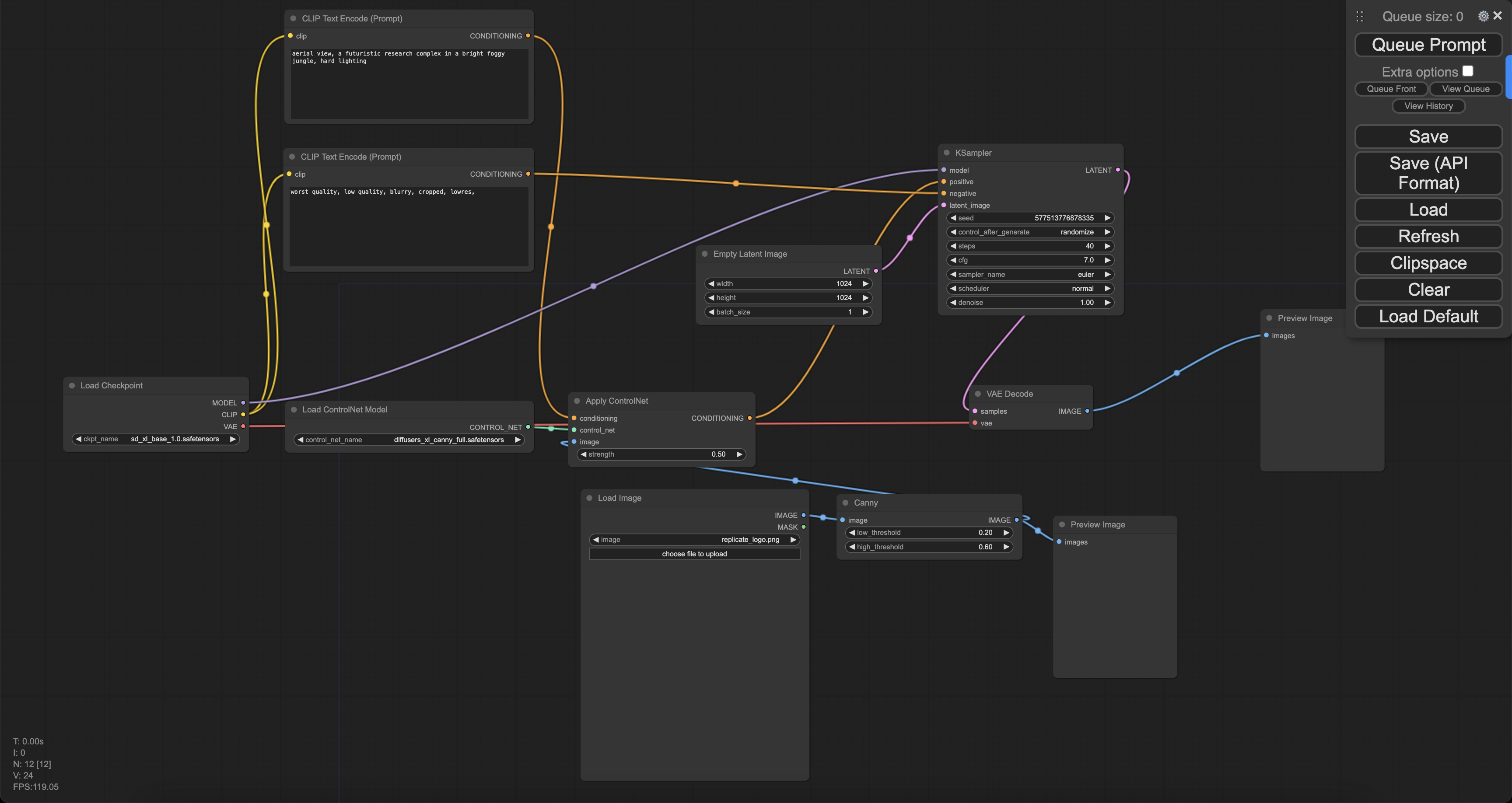 Don’t worry about the pre-filled values and prompts — they get overridden at inference time.
To export the workflow in API format, click the gear icon (settings) in the top-right hovering panel. Ensure that “Enable dev mode” is selected, then close the popup.
Don’t worry about the pre-filled values and prompts — they get overridden at inference time.
To export the workflow in API format, click the gear icon (settings) in the top-right hovering panel. Ensure that “Enable dev mode” is selected, then close the popup.
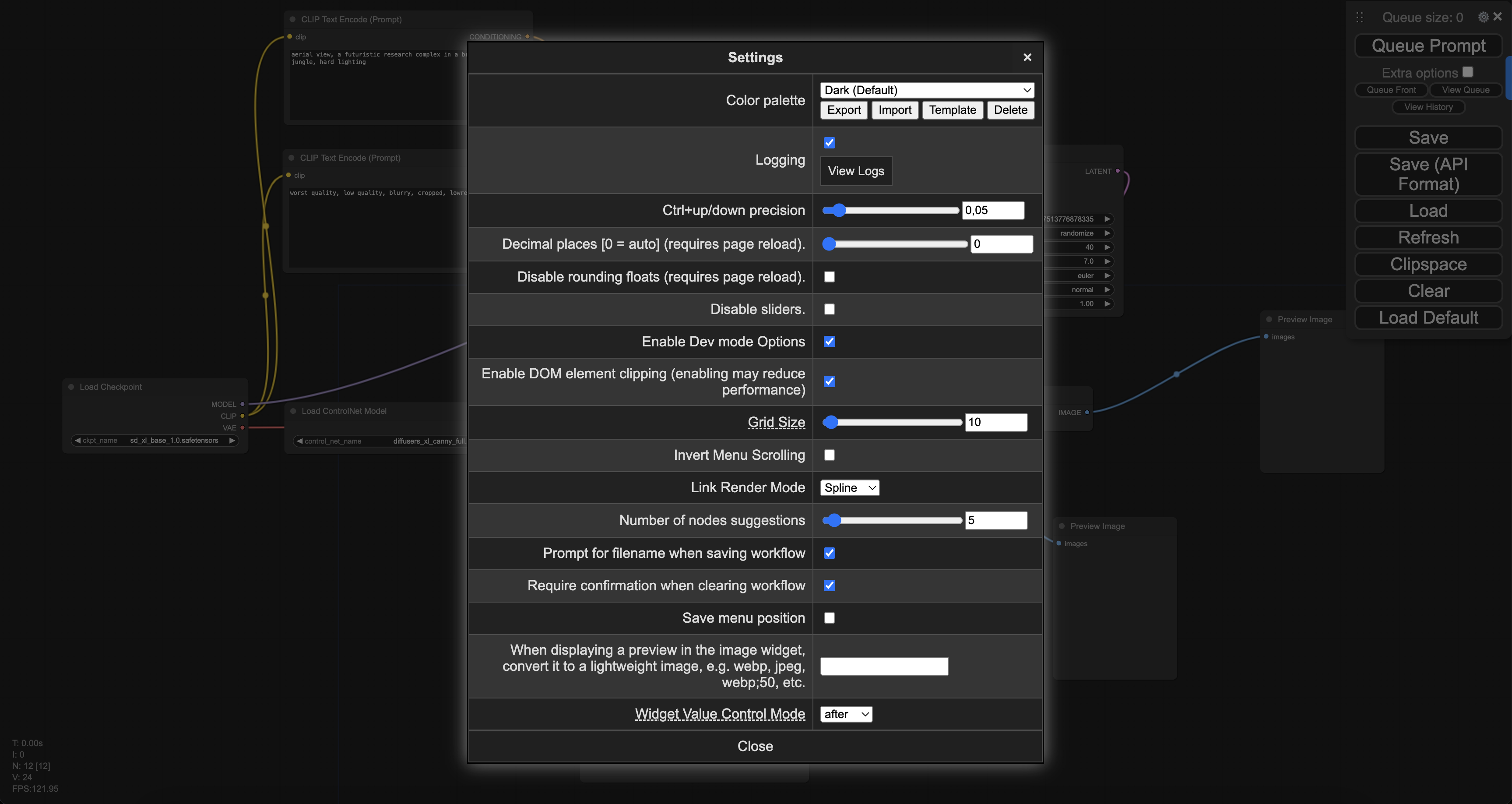 A button appears in the right hover panel labeled “Save (API format)”. Use it to save the workflow as “workflow\_api.json”
### ComfyUI Application
The main code in `main.py` uses the exported ComfyUI API workflow to create an endpoint. The code:
1. Initializes the ComfyUI server
2. Loads the workflow API template
3. Processes inputs (prompts, images) through the `run` function
4. Generates base64-encoded image outputs
Note: Cerebrium runs code outside the `run` function only during initialization, while the `run` function handles all subsequent requests.
Alter the workflow\_api.json file to include placeholders for user values at inference time:
* Replace line 4, the seed input, with: "\{\{seed}}"
* Replace line 45, the input text of node 6 with: "\{\{positive\_prompt}}"
* Replace line 58, the input text of node 7 with: "\{\{negative\_prompt}}"
* Replace line 108, the image of node 11 with: "\{\{controlnet\_image}}"
### FastAPI app
In addition to the `main.py` file below (which runs the FastAPI server and initializes ComfyUI on application start), a separate `helpers.py` file contains utility functions for working with ComfyUI. Find the helper code [here](https://github.com/CerebriumAI/examples/blob/master/7-image-and-video/1-comfyui/helpers.py). Create a file named `helpers.py` and copy the code into it.
```python theme={null}
import copy
import json
import logging
import os
import signal
import time
import uuid
from contextlib import contextmanager
from multiprocessing import Process
import websocket
from fastapi import FastAPI, BackgroundTasks, HTTPException
from fastapi.middleware.cors import CORSMiddleware
from helpers import (
convert_outputs_to_base64,
convert_request_file_url_to_path,
fill_template,
get_images,
setup_comfyui,
)
# Configure logging
logging.basicConfig(level=logging.INFO)
logger = logging.getLogger("comfyui-api")
# Initialize FastAPI app
app = FastAPI(title="ComfyUI API")
app.add_middleware(CORSMiddleware, allow_origins=["*"], allow_methods=["*"], allow_headers=["*"])
# Define configuration
server_address = "127.0.0.1:8188"
original_working_directory = os.getcwd()
json_workflow = None
side_process = None
WEBSOCKET_TIMEOUT = 60
@contextmanager
def websocket_connection():
"""Establish WebSocket connection to ComfyUI server with proper cleanup."""
client_id = str(uuid.uuid4())
ws = None
try:
ws = websocket.WebSocket()
ws.settimeout(WEBSOCKET_TIMEOUT)
ws.connect(f"ws://{server_address}/ws?clientId={client_id}")
logger.info("WebSocket connected successfully")
yield ws, client_id
except Exception as e:
logger.error(f"WebSocket connection error: {str(e)}")
raise HTTPException(status_code=503, detail=f"ComfyUI server connection error: {str(e)}")
finally:
if ws:
try:
ws.close()
except Exception:
pass
def load_workflow_file(file_path: str) -> dict:
"""Load workflow JSON file."""
try:
with open(file_path, "r") as json_file:
return json.load(json_file)
except FileNotFoundError:
logger.error(f"Workflow file not found: {file_path}")
raise HTTPException(status_code=500, detail=f"Workflow file not found: {file_path}")
except json.JSONDecodeError:
logger.error(f"Invalid JSON in workflow file: {file_path}")
raise HTTPException(status_code=500, detail=f"Invalid JSON in workflow file: {file_path}")
def cleanup_tempfiles(files):
"""Clean up temporary files."""
for file in files:
try:
if hasattr(file, 'name') and os.path.exists(file.name):
os.unlink(file.name)
except Exception as e:
logger.warning(f"Error cleaning up temp file: {str(e)}")
def terminate_process():
"""Terminate the ComfyUI process."""
global side_process
if side_process and side_process.is_alive():
logger.info("Terminating ComfyUI process...")
side_process.terminate()
side_process.join(timeout=5)
if side_process.is_alive():
side_process.kill()
@app.on_event("startup")
async def startup_event():
"""Start ComfyUI server on application startup."""
global json_workflow, side_process
# Load workflow JSON
json_workflow = load_workflow_file("workflow_api.json")
logger.info("Loaded workflow from workflow_api.json")
# Start ComfyUI process
if side_process is None:
side_process = Process(
target=setup_comfyui,
kwargs=dict(original_working_directory=original_working_directory, data_dir=""),
daemon=True,
)
side_process.start()
logger.info(f"Started ComfyUI process (PID: {side_process.pid})")
for sig in [signal.SIGINT, signal.SIGTERM]:
signal.signal(sig, lambda s, f: terminate_process())
# Wait for ComfyUI to start
max_attempts = 30
for attempt in range(max_attempts):
try:
with websocket_connection() as (ws, _):
logger.info("Successfully connected to ComfyUI!")
break
except Exception:
logger.info(f"Waiting for ComfyUI to start... ({attempt + 1}/{max_attempts})")
time.sleep(2)
else:
logger.warning("Could not confirm ComfyUI is running after multiple attempts")
@app.post("/run")
async def run(workflow_values: dict, background_tasks: BackgroundTasks):
"""Run a workflow with the provided template values."""
# Process input values
template_values, tempfiles = convert_request_file_url_to_path(workflow_values)
background_tasks.add_task(cleanup_tempfiles, tempfiles)
try:
with websocket_connection() as (ws, client_id):
# Apply template values to workflow
json_workflow_copy = copy.deepcopy(json_workflow)
json_workflow_copy = fill_template(json_workflow_copy, template_values)
# Run workflow and get outputs
outputs = get_images(ws, json_workflow_copy, client_id, server_address)
# Process outputs to base64
result = []
for node_id in outputs:
for unit in outputs[node_id]:
try:
file_name = unit.get("filename")
file_data = unit.get("data")
output = convert_outputs_to_base64(
node_id=node_id, file_name=file_name, file_data=file_data
)
result.append(output)
except Exception as e:
result.append({
"node_id": node_id,
"error": f"Failed to process output: {str(e)}",
"format": "error"
})
return {"result": result, "status": "success"}
except Exception as e:
logger.error(f"Error running workflow: {str(e)}")
raise HTTPException(status_code=500, detail=str(e))
@app.get("/health")
async def health_check():
"""Health check endpoint."""
global side_process
process_status = "running" if side_process and side_process.is_alive() else "not running"
return {
"status": "ok",
"comfyui_process": process_status,
"timestamp": time.time()
}
@app.on_event("shutdown")
def shutdown_event():
"""Clean up on application shutdown."""
logger.info("Application shutting down, cleaning up resources...")
terminate_process()
```
### Deploy ComfyUI Application
Before deploying, define the deployment configuration in `cerebrium.toml`. This specifies dependencies, hardware, scaling, and any pre-run scripts:
```
[cerebrium.deployment]
name = "1-comfyui"
python_version = "3.11"
include = ["./*", "main.py", "cerebrium.toml", "workflow.json", "workflow_api.json", "helpers.py", "model.json"]
exclude = ["./example_exclude", "./ComfyUI", "./ComfyUI/models/checkpoints/sd_xl_base_1.0.safetensors", "./ComfyUI/models/controlnet/diffusion_pytorch_model.fp16.safetensors"]
shell_commands = ["git clone https://github.com/comfyanonymous/ComfyUI", "pip install -r ComfyUI/requirements.txt"]
[cerebrium.runtime.custom]
port = 8765
entrypoint = ["uvicorn", "main:app", "--host", "0.0.0.0", "--port", "8765"]
healthcheck_endpoint = "/health"
[cerebrium.hardware]
compute = "AMPERE_A10"
cpu = 4
memory = 16.0
[cerebrium.scaling]
min_replicas = 0
max_replicas = 2
cooldown = 30
replica_concurrency = 1
response_grace_period = 900
scaling_metric = "concurrency_utilization"
scaling_target = 100
scaling_buffer = 0
[cerebrium.dependencies.pip]
uvicorn = "latest"
fastapi = "latest"
requests = "latest"
channels = "latest"
websockets = "latest"
websocket-client = "==1.6.4"
accelerate = "==0.23.0"
opencv-python = "latest"
pydantic = "latest"
pillow = "latest"
safetensors = "latest"
torch = "latest"
torchvision = "latest"
transformers = "latest"
torchsde = "latest"
einops = "latest"
aiohttp = "latest"
pyyaml = "latest"
Pillow = "latest"
scipy = "latest"
tqdm = "latest"
psutil = "latest"
kornia = ">=0.7.1"
[cerebrium.dependencies.apt]
git = "latest"
```
Running `cerebrium deploy` uploads both the ComfyUI directory and \~10GB of model weights. For slower connections, use the helper file to download model weights directly to the appropriate folders. Create a file called `model.json` with the following contents:
```json theme={null}
[
{
"url": "https://huggingface.co/stabilityai/stable-diffusion-xl-base-1.0/resolve/main/sd_xl_base_1.0.safetensors",
"path": "models/checkpoints/sd_xl_base_1.0.safetensors"
},
{
"url": "https://huggingface.co/diffusers/controlnet-canny-sdxl-1.0/resolve/main/diffusion_pytorch_model.fp16.safetensors",
"path": "models/controlnet/diffusers_xl_canny_full.safetensors"
}
]
```
This configuration tells the helper function where to download models from and where to save them. Models download only on first deployment, with subsequent deploys checking for existing files.
This is what your file folder structure should look like:
A button appears in the right hover panel labeled “Save (API format)”. Use it to save the workflow as “workflow\_api.json”
### ComfyUI Application
The main code in `main.py` uses the exported ComfyUI API workflow to create an endpoint. The code:
1. Initializes the ComfyUI server
2. Loads the workflow API template
3. Processes inputs (prompts, images) through the `run` function
4. Generates base64-encoded image outputs
Note: Cerebrium runs code outside the `run` function only during initialization, while the `run` function handles all subsequent requests.
Alter the workflow\_api.json file to include placeholders for user values at inference time:
* Replace line 4, the seed input, with: "\{\{seed}}"
* Replace line 45, the input text of node 6 with: "\{\{positive\_prompt}}"
* Replace line 58, the input text of node 7 with: "\{\{negative\_prompt}}"
* Replace line 108, the image of node 11 with: "\{\{controlnet\_image}}"
### FastAPI app
In addition to the `main.py` file below (which runs the FastAPI server and initializes ComfyUI on application start), a separate `helpers.py` file contains utility functions for working with ComfyUI. Find the helper code [here](https://github.com/CerebriumAI/examples/blob/master/7-image-and-video/1-comfyui/helpers.py). Create a file named `helpers.py` and copy the code into it.
```python theme={null}
import copy
import json
import logging
import os
import signal
import time
import uuid
from contextlib import contextmanager
from multiprocessing import Process
import websocket
from fastapi import FastAPI, BackgroundTasks, HTTPException
from fastapi.middleware.cors import CORSMiddleware
from helpers import (
convert_outputs_to_base64,
convert_request_file_url_to_path,
fill_template,
get_images,
setup_comfyui,
)
# Configure logging
logging.basicConfig(level=logging.INFO)
logger = logging.getLogger("comfyui-api")
# Initialize FastAPI app
app = FastAPI(title="ComfyUI API")
app.add_middleware(CORSMiddleware, allow_origins=["*"], allow_methods=["*"], allow_headers=["*"])
# Define configuration
server_address = "127.0.0.1:8188"
original_working_directory = os.getcwd()
json_workflow = None
side_process = None
WEBSOCKET_TIMEOUT = 60
@contextmanager
def websocket_connection():
"""Establish WebSocket connection to ComfyUI server with proper cleanup."""
client_id = str(uuid.uuid4())
ws = None
try:
ws = websocket.WebSocket()
ws.settimeout(WEBSOCKET_TIMEOUT)
ws.connect(f"ws://{server_address}/ws?clientId={client_id}")
logger.info("WebSocket connected successfully")
yield ws, client_id
except Exception as e:
logger.error(f"WebSocket connection error: {str(e)}")
raise HTTPException(status_code=503, detail=f"ComfyUI server connection error: {str(e)}")
finally:
if ws:
try:
ws.close()
except Exception:
pass
def load_workflow_file(file_path: str) -> dict:
"""Load workflow JSON file."""
try:
with open(file_path, "r") as json_file:
return json.load(json_file)
except FileNotFoundError:
logger.error(f"Workflow file not found: {file_path}")
raise HTTPException(status_code=500, detail=f"Workflow file not found: {file_path}")
except json.JSONDecodeError:
logger.error(f"Invalid JSON in workflow file: {file_path}")
raise HTTPException(status_code=500, detail=f"Invalid JSON in workflow file: {file_path}")
def cleanup_tempfiles(files):
"""Clean up temporary files."""
for file in files:
try:
if hasattr(file, 'name') and os.path.exists(file.name):
os.unlink(file.name)
except Exception as e:
logger.warning(f"Error cleaning up temp file: {str(e)}")
def terminate_process():
"""Terminate the ComfyUI process."""
global side_process
if side_process and side_process.is_alive():
logger.info("Terminating ComfyUI process...")
side_process.terminate()
side_process.join(timeout=5)
if side_process.is_alive():
side_process.kill()
@app.on_event("startup")
async def startup_event():
"""Start ComfyUI server on application startup."""
global json_workflow, side_process
# Load workflow JSON
json_workflow = load_workflow_file("workflow_api.json")
logger.info("Loaded workflow from workflow_api.json")
# Start ComfyUI process
if side_process is None:
side_process = Process(
target=setup_comfyui,
kwargs=dict(original_working_directory=original_working_directory, data_dir=""),
daemon=True,
)
side_process.start()
logger.info(f"Started ComfyUI process (PID: {side_process.pid})")
for sig in [signal.SIGINT, signal.SIGTERM]:
signal.signal(sig, lambda s, f: terminate_process())
# Wait for ComfyUI to start
max_attempts = 30
for attempt in range(max_attempts):
try:
with websocket_connection() as (ws, _):
logger.info("Successfully connected to ComfyUI!")
break
except Exception:
logger.info(f"Waiting for ComfyUI to start... ({attempt + 1}/{max_attempts})")
time.sleep(2)
else:
logger.warning("Could not confirm ComfyUI is running after multiple attempts")
@app.post("/run")
async def run(workflow_values: dict, background_tasks: BackgroundTasks):
"""Run a workflow with the provided template values."""
# Process input values
template_values, tempfiles = convert_request_file_url_to_path(workflow_values)
background_tasks.add_task(cleanup_tempfiles, tempfiles)
try:
with websocket_connection() as (ws, client_id):
# Apply template values to workflow
json_workflow_copy = copy.deepcopy(json_workflow)
json_workflow_copy = fill_template(json_workflow_copy, template_values)
# Run workflow and get outputs
outputs = get_images(ws, json_workflow_copy, client_id, server_address)
# Process outputs to base64
result = []
for node_id in outputs:
for unit in outputs[node_id]:
try:
file_name = unit.get("filename")
file_data = unit.get("data")
output = convert_outputs_to_base64(
node_id=node_id, file_name=file_name, file_data=file_data
)
result.append(output)
except Exception as e:
result.append({
"node_id": node_id,
"error": f"Failed to process output: {str(e)}",
"format": "error"
})
return {"result": result, "status": "success"}
except Exception as e:
logger.error(f"Error running workflow: {str(e)}")
raise HTTPException(status_code=500, detail=str(e))
@app.get("/health")
async def health_check():
"""Health check endpoint."""
global side_process
process_status = "running" if side_process and side_process.is_alive() else "not running"
return {
"status": "ok",
"comfyui_process": process_status,
"timestamp": time.time()
}
@app.on_event("shutdown")
def shutdown_event():
"""Clean up on application shutdown."""
logger.info("Application shutting down, cleaning up resources...")
terminate_process()
```
### Deploy ComfyUI Application
Before deploying, define the deployment configuration in `cerebrium.toml`. This specifies dependencies, hardware, scaling, and any pre-run scripts:
```
[cerebrium.deployment]
name = "1-comfyui"
python_version = "3.11"
include = ["./*", "main.py", "cerebrium.toml", "workflow.json", "workflow_api.json", "helpers.py", "model.json"]
exclude = ["./example_exclude", "./ComfyUI", "./ComfyUI/models/checkpoints/sd_xl_base_1.0.safetensors", "./ComfyUI/models/controlnet/diffusion_pytorch_model.fp16.safetensors"]
shell_commands = ["git clone https://github.com/comfyanonymous/ComfyUI", "pip install -r ComfyUI/requirements.txt"]
[cerebrium.runtime.custom]
port = 8765
entrypoint = ["uvicorn", "main:app", "--host", "0.0.0.0", "--port", "8765"]
healthcheck_endpoint = "/health"
[cerebrium.hardware]
compute = "AMPERE_A10"
cpu = 4
memory = 16.0
[cerebrium.scaling]
min_replicas = 0
max_replicas = 2
cooldown = 30
replica_concurrency = 1
response_grace_period = 900
scaling_metric = "concurrency_utilization"
scaling_target = 100
scaling_buffer = 0
[cerebrium.dependencies.pip]
uvicorn = "latest"
fastapi = "latest"
requests = "latest"
channels = "latest"
websockets = "latest"
websocket-client = "==1.6.4"
accelerate = "==0.23.0"
opencv-python = "latest"
pydantic = "latest"
pillow = "latest"
safetensors = "latest"
torch = "latest"
torchvision = "latest"
transformers = "latest"
torchsde = "latest"
einops = "latest"
aiohttp = "latest"
pyyaml = "latest"
Pillow = "latest"
scipy = "latest"
tqdm = "latest"
psutil = "latest"
kornia = ">=0.7.1"
[cerebrium.dependencies.apt]
git = "latest"
```
Running `cerebrium deploy` uploads both the ComfyUI directory and \~10GB of model weights. For slower connections, use the helper file to download model weights directly to the appropriate folders. Create a file called `model.json` with the following contents:
```json theme={null}
[
{
"url": "https://huggingface.co/stabilityai/stable-diffusion-xl-base-1.0/resolve/main/sd_xl_base_1.0.safetensors",
"path": "models/checkpoints/sd_xl_base_1.0.safetensors"
},
{
"url": "https://huggingface.co/diffusers/controlnet-canny-sdxl-1.0/resolve/main/diffusion_pytorch_model.fp16.safetensors",
"path": "models/controlnet/diffusers_xl_canny_full.safetensors"
}
]
```
This configuration tells the helper function where to download models from and where to save them. Models download only on first deployment, with subsequent deploys checking for existing files.
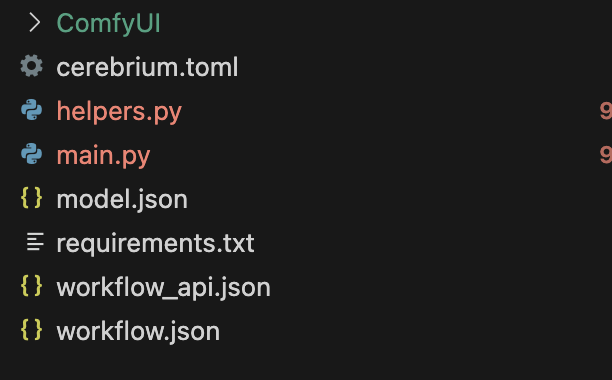
This is what your file folder structure should look like:
 Deploy the application: `cerebrium deploy`
After successful deployment, make a request to the endpoint with the following JSON payload:
```curl theme={null}
curl --location 'https://api.cerebrium.ai/v4/p-xxxxxxxx/1-comfyui/run' \
--header 'Content-Type: application/json' \
--header 'Authorization: Bearer ' \
--data '{"workflow_values": {
"positive_prompt": "A top down view of a mountain with large trees and green plants",
"negative_prompt": "blurry, text, low quality",
"controlnet_image": "https://cerebrium-assets.s3.eu-west-1.amazonaws.com/qr-code.png",
"seed": 1000
}
}'
```
The output contains two responses:
* A base64-encoded image of the ControlNet input outline, used as input in the flow.
* A base64-encoded image of the final result.
Deploy the application: `cerebrium deploy`
After successful deployment, make a request to the endpoint with the following JSON payload:
```curl theme={null}
curl --location 'https://api.cerebrium.ai/v4/p-xxxxxxxx/1-comfyui/run' \
--header 'Content-Type: application/json' \
--header 'Authorization: Bearer ' \
--data '{"workflow_values": {
"positive_prompt": "A top down view of a mountain with large trees and green plants",
"negative_prompt": "blurry, text, low quality",
"controlnet_image": "https://cerebrium-assets.s3.eu-west-1.amazonaws.com/qr-code.png",
"seed": 1000
}
}'
```
The output contains two responses:
* A base64-encoded image of the ControlNet input outline, used as input in the flow.
* A base64-encoded image of the final result.
 ### Conclusion
Cerebrium enables production-ready ComfyUI workflows that automatically scale with demand, with costs aligned to actual compute usage. Share creations by tagging @cerebriumai.
### Conclusion
Cerebrium enables production-ready ComfyUI workflows that automatically scale with demand, with costs aligned to actual compute usage. Share creations by tagging @cerebriumai.